Infinite Scroll
Pro feature. Available in Listora Pro.
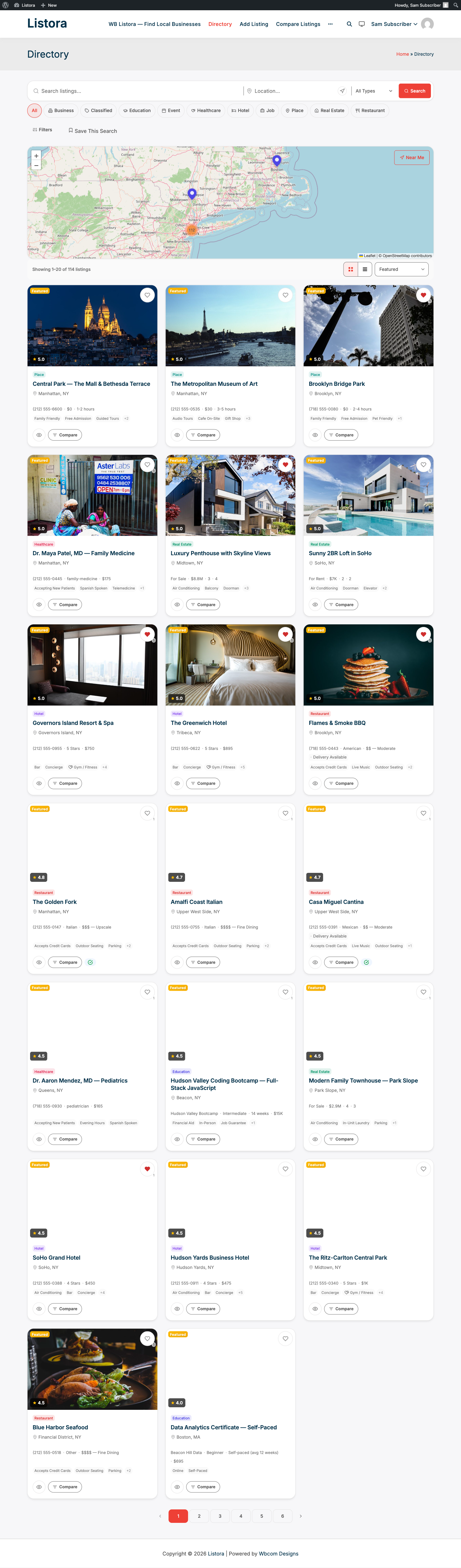
Availability: Pro only. Requires Listora Pro. Replace the paginated grid with infinite scroll or load-more button UX on listing grids - keeps visitors in flow, never breaks scroll position, never requires a click to advance. Choose the mode globally (pagination / load-more / infinite scroll) from Settings; works with every listing-grid block on the site.
What it is
Pagination is the safest default - clear, accessible, screen-reader friendly. But for high-engagement directory browsing (restaurants on a Friday night, real estate, events), endless scroll mirrors how visitors actually browse on phones.
Infinite Scroll is a drop-in mode swap for the existing listing-grid block:
- Three modes -
pagination(default),load_more(button at the end of the grid that fetches the next page),infinite_scroll(automatic fetch when the grid bottom enters the viewport). - One global setting controls all listing-grid blocks site-wide; per-block override is on the roadmap.
- REST-driven - uses the existing
GET /listora/v1/listingsendpoint with cursor pagination so the n-th page is O(1) (not O(n) like OFFSET). - Filter
wb_listora_grid_outputis how the feature replaces the pagination markup with the infinite-scroll trigger / load-more button. Free's grid remains unchanged. - Card markup injection - the response includes a pre-rendered
card_htmlfield (added viainject_card_html) so the client doesn't have to re-render the card template, just append the HTML. - Sentinel element + IntersectionObserver - when in
infinite_scrollmode, a sentinel<div class="listora-grid__load-more-sentinel">appears at the grid bottom; an observer fires when it enters the viewport and triggers the fetch. - A11y-aware - pagination remains the default precisely because infinite scroll breaks keyboard-only navigation and the screen-reader experience. Pick the mode appropriate for your audience.
How you use it
As a site owner - choose your pagination mode
- Enable the feature: Listora → Settings → Features → Infinite Scroll (default: off per product design - pagination is the safe default).
- Settings → General → Basics → Pagination style - radio choice between:
- Page numbers (numbered pages) - best for accessibility and search engines.
- Load more button (button at the end of the grid) - middle ground; keyboard-reachable.
- Infinite scroll (automatic) - best for mobile flow; weakest for accessibility.
- Save. The change takes effect site-wide; refresh any directory page to see the new mode.
As a visitor - what changes
| Mode | What you see |
|---|---|
| Pagination | Numbered pagination at the bottom of the grid (1 2 3 …) - Free default. |
| Load More | A "Load more listings" button at the bottom - click to fetch + append the next page. Scroll position preserved. |
| Infinite Scroll | Listings auto-append as you scroll. A subtle loader spins near the bottom while fetching. Use the browser's "scroll to top" if you want to go back. |
For accessibility, every mode preserves: aria-live updates for screen readers when new cards load; focus management on the next-page first card after Load More; ESC interrupts an active scroll-load.
Settings & options
| Setting | Location | Default | Notes |
|---|---|---|---|
| Feature toggle | Settings → Features → Infinite Scroll | Off | Off by default; pagination is the safer accessibility floor |
| Pagination style | Settings → General → Basics → Pagination style | pagination |
Three modes: pagination / load_more / infinite_scroll |
| Cards per fetch | (uses per_page from grid block) |
12 | Configurable per block in the editor |
| REST source | GET /listora/v1/listings?cursor=… |
- | Cursor pagination - O(1) past page 1000 |
Developer hooks:
wb_listora_pro_pagination_type(filter) - programmatically override the mode (e.g. force load-more for one specific block).wb_listora_pro_infinite_scroll_threshold_px(filter) - fire the next fetch when the sentinel is N pixels from entering the viewport (default 200).wb_listora_grid_output(filter, Free) - the hook this feature uses to swap the pagination markup. Other extensions can hook the same filter.
Related
- Search & Filters - the underlying grid + search.
- Advanced Search (Pro) - works with all three pagination modes.
- Developer Reference: REST API - cursor pagination contract on
/listings.