Featured Listings
Availability: Free + Pro. Free ships the Featured block, the
Featured_Metaboxadmin one-click feature +_listora_is_featuredmeta + auto-fill fallback. Pro adds the pricing-plan featured flag + credit-gated rotation.
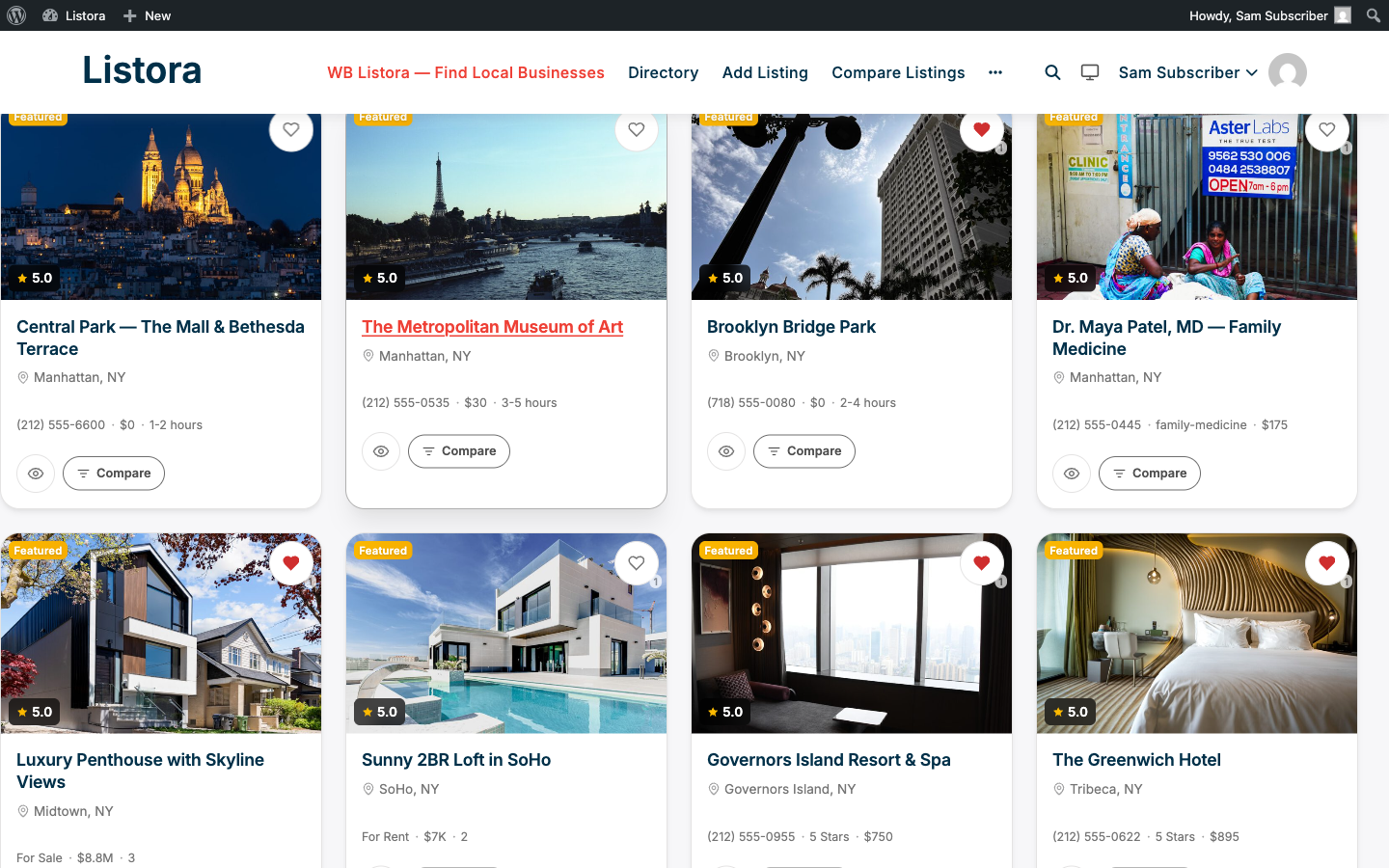
A dedicated block to surface your best content - featured listings (admin-marked or plan-driven) at the top of the page, with a carousel option for hero layouts. With Sort by Featured it shows only featured listings. When there are none it shows its empty state instead of filling the space with ordinary listings.
What it is
Most directories need a way to put a thumb on the scale - surface paid premium listings, editorially-promoted picks, or hot new businesses. Featured Listings is that surface, with a graceful empty-state fallback.
The system has these inputs:
- Manual feature flag (Free) - admins flag any listing via the
Featuredcheckbox in the Edit Listing screen (Featured_Metabox); a_listora_is_featuredpost-meta key controls the badge + Featured-block inclusion. - Pricing-plan featured flag (Pro) - Pricing Plans (Pro) can mark a plan's listings as automatically featured (
featured = truein the plan record). Listings on that plan are featured for the plan's duration. - No filler - the block shows only listings that are featured, even if that is fewer than Count. Filling the gap with top-rated listings made every card look featured. Developers who want the old behaviour can return
truefrom thewb_listora_featured_backfillfilter.
How it renders:
- Row of cards - the cards per row follow Columns and shrink on smaller screens. Extra cards sit in the same row and scroll sideways.
- Carousel arrows - when there is more than one page of cards, Previous and Next arrows appear beside the title, and dots appear under the cards. An arrow moves by a whole page of cards, however many columns are showing, and the dots jump to a page. When everything fits on one page there are no arrows or dots.
- Featured badge - every card carries a "Featured" pill rendered via the canonical
.listora-badge--featuredtoken; same look as the search-grid badge. - Modernized surface - uses
--listora-radius-xl+--listora-shadow-md+--listora-bg-elevated- identical to other list-container surfaces (light + dark inversion automatic). - Hook surface -
do_action( 'wb_listora_before_featured_listings' ),apply_filters( 'wb_listora_featured_query_args', $args ),do_action( 'wb_listora_after_featured_listings' )- Pro hookswb_listora_featured_query_argsto inject credit-gated rotation when the Featured feature is on.
How you use it
As a site owner - place the block
- Edit a page - typically your homepage or a "Featured" landing page.
- Insert the Listora Featured block.
- Inspector controls:
- Listing Type - restrict to one type (e.g. featured Restaurants only).
- Sort By - Featured (only featured listings), Newest or Rating.
- Count - how many listings to show (default 8).
- Columns - how many cards per row (1 to 6, default 4).
- Title - an optional heading. It is hidden when it just repeats the page title.
- Manually feature a listing: WP Admin → Listora → All Listings → edit a listing → in the right sidebar metabox, tick Featured. Save. The listing now appears in the Featured block.
As a Pro user - credit-gated featured rotation
In Pro, the Featured feature (credit-system + pricing-plans) introduces:
- A "Featured" perk on certain pricing plans - listings on those plans are featured for the plan's duration automatically.
- A daily Action Scheduler job
wb_listora_expire_featuredthat demotes listings whose featured-from-plan period has ended. - A
Featured::feature_listing()API used by both manual and credit-gated paths so rotation logic is shared.
Settings & options
| Setting | Location | Default | Notes |
|---|---|---|---|
| Block | Editor → Insert → Listora Featured | - | Server-rendered |
| Manual feature flag | Edit Listing → sidebar metabox → Featured | Off | Free |
| Backfill with top-rated | wb_listora_featured_backfill filter |
Off | Return true to fill empty slots with top-rated listings |
| Pro: featured plan perk | Pricing Plan edit → Featured | Off per plan | When on, listings on the plan are featured automatically |
| Expiration cron (Free) | wb_listora_expire_featured |
Daily | Action Scheduler - demotes listings whose featured period has ended (manual + plan-driven both share this) |
Developer hooks:
wb_listora_before_featured_listings/wb_listora_after_featured_listings(actions).wb_listora_featured_query_args(filter) - Pro extends via this to enforce credit-gated rotation.wb_listora_featured_card_data(filter) - modify per-card data before rendering.
Related
- Pricing Plans (Pro) - plans with the "Featured" perk auto-feature listings.
- Listing Categories (Free) - pair with Featured for a "Browse by Category" + "Editor's Picks" homepage.
- Search & Filters - sort-by-featured is also available in the main grid (not just the dedicated block).
- Developer Reference: Hooks - full Featured hooks list.