Amenities / Features Taxonomy
Availability: Free + Pro.
A flat (non-hierarchical) taxonomy for tagging listings with the amenities or attributes that matter to the customer - Free WiFi, Parking, Pet Friendly, Wheelchair Accessible, Outdoor Seating, etc. Different from Categories (what the listing IS) and Locations (where it IS) - amenities are the FACETS visitors filter on within a category.
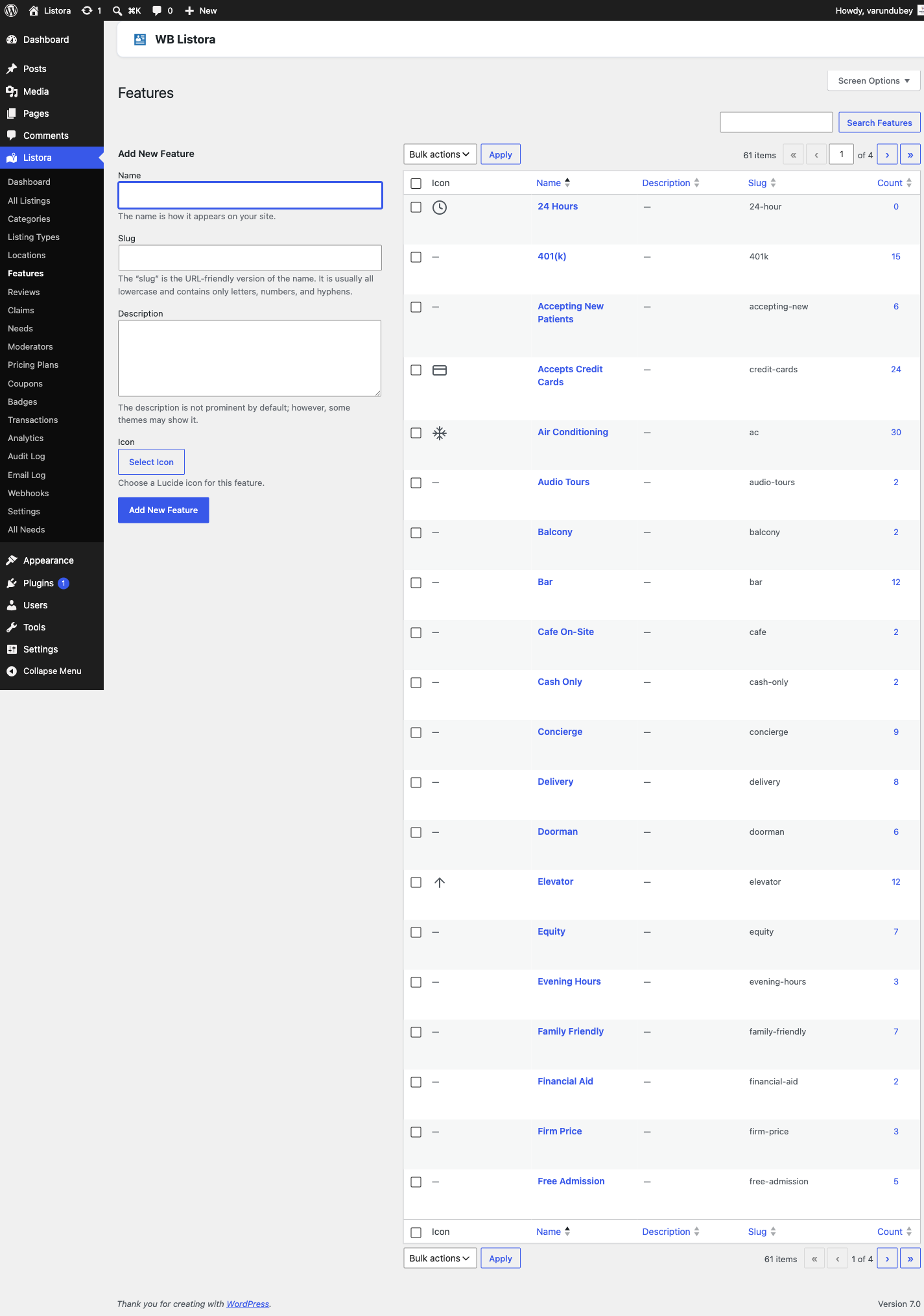
What it is
The listora_listing_feature taxonomy. Same shape as WordPress's built-in post_tag (flat, comma-separated entry, no parent/child), specialized for directory amenities:
- Flat - no parent/child. Amenities are independent attributes; nesting them adds friction without value.
- Comma-entry on the listing edit screen - type "WiFi, Parking, Pet Friendly" and tab to add. Autocomplete suggests existing terms.
- Public archive at
/{feature_slug}/{term}/- shows every listing with that amenity. - Search facet - the
listing-searchblock's "Features" facet auto-populates from this taxonomy. Multi-select is the natural UX (visitors filter by "WiFi AND Parking AND Pet Friendly"). - REST-exposed at
/wp-json/wp/v2/listing-features(WP core) and/wp-json/listora/v1/search?feature[]=wifi,parking(Listora search facet).
Listora calls these "Features" in admin UI to keep terminology consistent with WordPress (we already overload "Categories" for listora_listing_cat, and the post type is "Listing", so "Features" is the natural complement). Many directories use the customer-facing label "Amenities" instead - change it via the wb_listora_taxonomy_labels filter or directly in the registration via register_taxonomy_for_object_type().
How you use it
Build your amenity list
- Admin → Listora → Categories → Features.
- Add the amenities customers will filter on. Common starter set:
- WiFi, Parking, Wheelchair Accessible, Pet Friendly, Outdoor Seating, Takeout, Delivery, Reservations Required, Vegan Options, Family Friendly, 24/7, Credit Cards Accepted
- Keep the list FLAT and SCANNABLE. 8-15 amenities is the sweet spot for filtering UX. Bigger lists overwhelm the sidebar.
- Use existing terms - encourage listing owners to pick existing amenities rather than create new ones. The submission wizard's autocomplete makes this natural.
The Features list has a Listing types column that shows which listing types offer each feature (None when no type does), and a row of links above the table, All types and one per listing type, that narrow the list to the features one type offers. With many features this is the quickest way to see what a Jobs type offers compared with a Classifieds type. Description and Slug are hidden by default; bring them back from Screen Options. See Browse by Category for the same view on categories.
Assign amenities to a listing
- Wizard - Features field appears as a tag picker (autocomplete from existing terms) in step 2 of the submission wizard. Customers can pick existing terms; creating new ones requires
manage_listora_types. - Member dashboard - members set and change amenities when editing a listing from Dashboard > Listings > Edit. Until 1.6.0 this was an administrator-only field reachable only from wp-admin, so a member who wanted to add "Outdoor Seating" had to ask. The write path preserves amenities an administrator set that the member's form does not offer, so a member saving their listing cannot silently strip them.
- Admin - the standard WP taxonomy metabox on listing edit screens.
- CSV import - comma-separated term slugs in the
listora_listing_featurecolumn. - REST -
POST /listora/v1/submitacceptslistora_listing_feature: ['wifi', 'parking'](slugs).
Filter by amenity
- Search block - Features facet on the sidebar / drawer of
listing-searchblock. Multi-select (AND logic by default - listings matching ALL selected amenities). Switch to OR viawb_listora_search_feature_logicfilter. - Archive page -
/{feature_slug}/wifi/lists every listing tagged WiFi. Order via the standardpre_get_postshook. - Card display - toggle the Features chips on the Listing Card block's Inspector → Display panel.
Limiting features to a listing type
Features used to be global: every type offered every feature. On a site running Jobs and Classifieds side by side, the Jobs filter offered classified-ad amenities and vice versa.
A listing type can now carry a feature allowlist, edited in the Type Editor alongside its existing category allowlist. An empty allowlist means no restriction, so every existing type keeps offering every feature until you deliberately narrow one.
The allowlist is honoured in both places that matter, from one shared resolver, so the search filters and the submission form cannot drift apart: a member is only offered the features their type allows, and a visitor only sees those features as facets.
Permissions
| Capability | Who has it | What it gates |
|---|---|---|
manage_listora_types |
Administrator (custom roles via Capabilities) | Add / edit / delete Feature terms |
edit_listora_listings |
Admin, Editor, Author, Contributor, Subscriber | Assign existing Feature terms to listings |
Customers can't add new amenities from the frontend wizard by default - they pick from the curated list. To allow open submission, filter wb_listora_submission_can_create_terms to true.
Customizing the customer-facing label
Default admin label is "Features" but many directories prefer "Amenities". Override globally:
add_filter( 'wb_listora_taxonomy_labels', function ( $labels, $taxonomy ) {
if ( 'listora_listing_feature' !== $taxonomy ) {
return $labels;
}
$labels['name'] = __( 'Amenities', 'your-textdomain' );
$labels['singular_name'] = __( 'Amenity', 'your-textdomain' );
$labels['menu_name'] = __( 'Amenities', 'your-textdomain' );
return $labels;
}, 10, 2 );
Settings & options
| Setting | Default | Where |
|---|---|---|
| Archive permalink base | listing-feature |
Settings → General → Slugs |
| Show Features facet on search | On | Listing Search block → Inspector → Filters |
| Show Features chips on card | On | Listing Card block → Inspector → Display |
| Multi-select logic | AND (listings matching all selected) | wb_listora_search_feature_logic filter |
Related
- Listing Categories - what the listing is (hierarchical).
- Locations - where the listing is (hierarchical).
- Search & Filters - how the Features facet renders on listing-search.
- Advanced Search (Pro) - saved filters and proximity search on top of amenities.
- Custom Fields - when an amenity needs structured data (e.g. WiFi password) instead of a tag.