Advanced Search
Pro feature. Available in Listora Pro.
Availability: Pro only. Requires Listora Pro. Power-user search that goes beyond keyword + category - multi-facet filtering (price range, rating, distance radius, custom field values), saved-search alerts that email new matches daily, and a wider field weight tuned for relevance. Built on the same query engine as Free search, just unlocked with more signal.
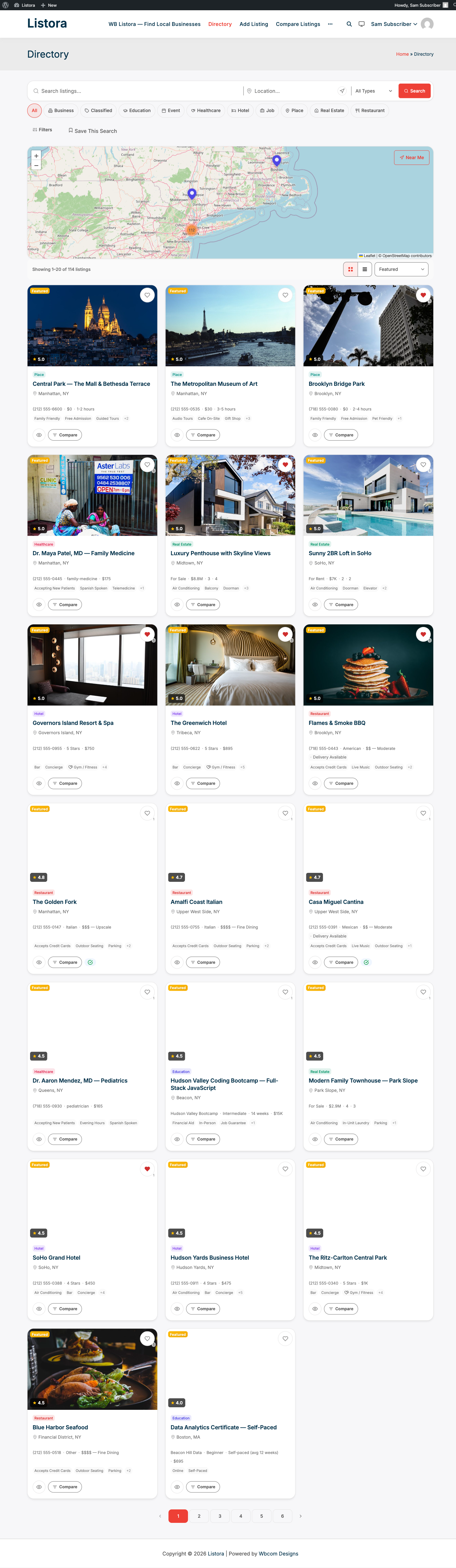
What it is
Free Listora ships a solid search experience - keyword + listing type + category + map radius. Advanced Search extends it for the segments that need more:
- Multi-facet UI - open a "More filters" panel and combine: keyword, type, category, location (with adjustable radius), price range, rating threshold, custom-field values (e.g. amenities for hotels, "remote OK" for jobs), open-now-only for businesses with hours.
- Saved searches - once a visitor finds a filter combo they like, they save it (in their
wp_user_metaunder_listora_saved_searches). - Daily email alerts - Action Scheduler job
wb_listora_pro_saved_search_alertsruns daily, finds new listings matching any user's saved searches since the last run, and emails matches via thesaved-search-alert.phptemplate. - Tuned relevance - Advanced Search uses a different MySQL
MATCH AGAINSTweight + a larger candidate pool than Free search, so long-tail queries return more results. - REST routes -
GET /listora/v1/saved-searches,POST /listora/v1/saved-searches,PATCH /listora/v1/saved-searches/{id},DELETE /listora/v1/saved-searches/{id}- usable by your own mobile app.
Combined with Programmatic SEO Pages, Advanced Search turns the directory into a real search destination - not just a browsing surface.
How you use it
As a site owner - enable + configure
- Enable the feature: Listora → Settings → Features → Saved Searches & Alerts (default: off per product design - turn on intentionally; defaults emphasize the simpler search UX).
- Visit your Directory page in an incognito window - verify a More filters button appears next to the existing search bar. Click it; the multi-facet panel slides open.
- Saved-search alerts: members switch email alerts on or off for each saved search from their own dashboard. There is no site-wide alerts setting, and there are no settings for which filters appear.
As a visitor - power-search
- On the Directory page, click More filters.
- Set price range, rating, radius, custom fields. Hit Apply.
- The grid + map update. Refine until you have what you want.
- Click Save this search → name it ("Pet-friendly hotels in NYC under $200"). The search is stored against your user account.
- From now on, when a new listing matches your search, you receive an email digest (daily) listing the matches with one-click links.
- Manage saved searches from your dashboard → Saved Searches tab - edit, rename, disable, delete.
Settings & options
| Setting | Location | Default | Notes |
|---|---|---|---|
| Feature toggle | Settings → Features → Saved Searches & Alerts | Off | Off by default - enable if your audience benefits from filter density |
| Email alerts | Each saved search, in the member's dashboard | Set per saved search | The daily run is scheduled for you |
| Alert cron | wb_listora_pro_saved_search_alerts |
Daily | Action Scheduler |
| Storage (saved searches) | wp_usermeta._listora_saved_searches |
- | Per-user, JSON-encoded |
| Storage (alert state) | wp_usermeta._listora_saved_search_last_alert_at |
- | Per-saved-search timestamp |
REST routes (logged-in):
GET /wp-json/listora/v1/saved-searches- list the current user's saved searches.POST /wp-json/listora/v1/saved-searches- create one.PATCH /wp-json/listora/v1/saved-searches/{id}- rename, change filter, toggle alerts.DELETE /wp-json/listora/v1/saved-searches/{id}- delete.
Developer hooks:
wb_listora_pro_advanced_search_facets(filter) - modify the facet list shown in the More-Filters panel per page.wb_listora_pro_saved_search_alert_subject(filter) - modify the daily alert email subject.wb_listora_pro_saved_search_match_query(filter) - modify the candidate-match SQL (e.g. exclude listings older than 1 hour).
Related
- Search & Filters (Free) - the underlying search engine; Advanced Search is the extended UX on top.
- Saved Searches (Pro) - companion doc focused on the alert flow specifically.
- Programmatic SEO Pages (Pro) - turn high-value filter combinations into indexed landing pages.
- Developer Reference: REST API -
/saved-searches/*endpoint shapes.