Locations
Availability: Free + Pro.
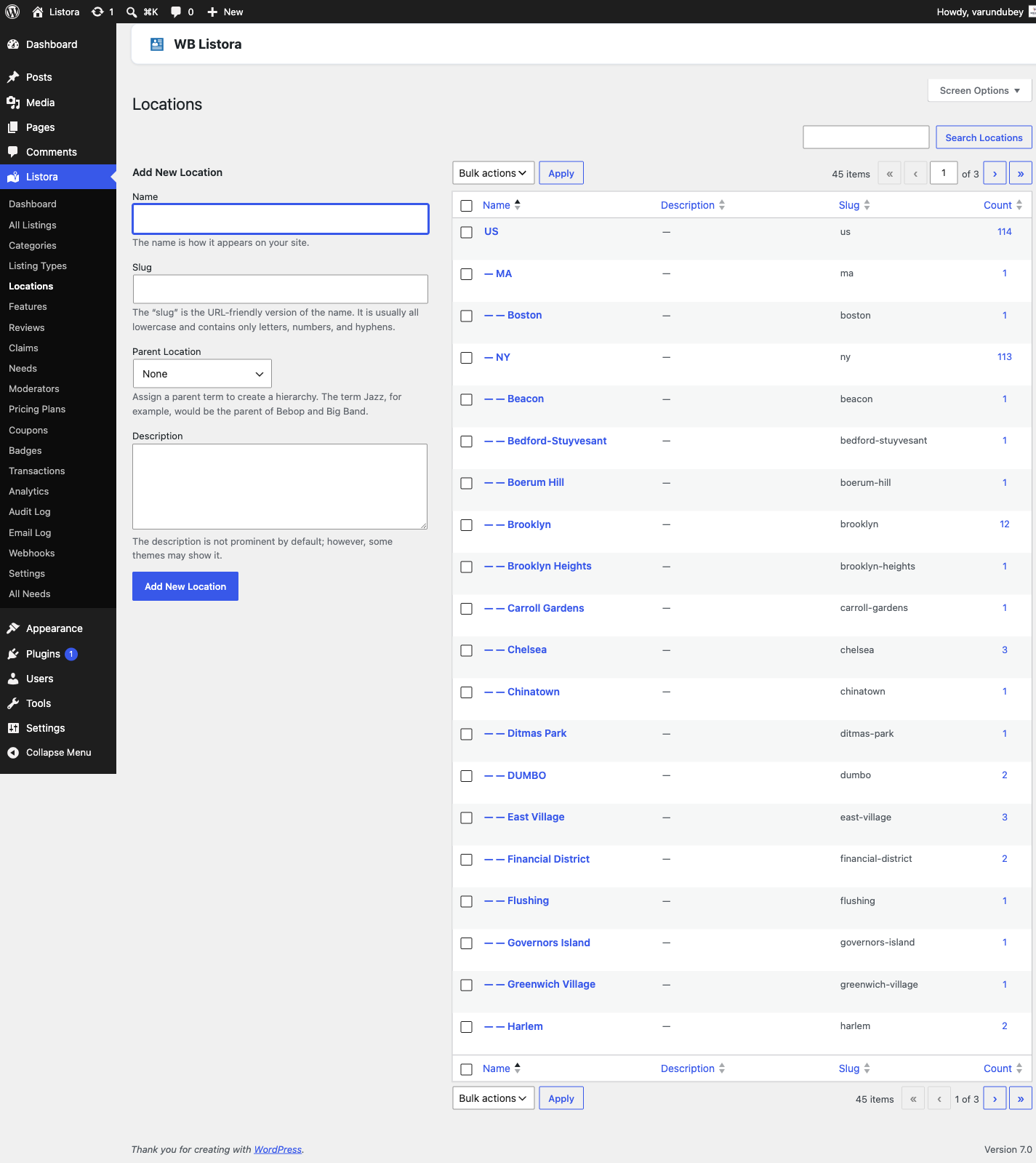
Hierarchical geographic taxonomy that maps every listing to the place it lives - Country → State → City → Neighborhood, as deep as you need. Locations get their own admin page (Listora → Locations), their own pretty URL (/listing-location/new-york/manhattan/), their own WP-core REST endpoint (/wp-json/wp/v2/listing-locations), and they auto-populate the location facet on every search and grid block.
What it is
Locations is the listora_listing_location taxonomy - same shape as WordPress's built-in category (hierarchical, parent/child, slug-based URLs), specialized for directory geography:
- Hierarchical so you can nest as deep as the site needs. Single-city directory? One level. Country-wide directory? Three or four (Country → State → City → Neighborhood).
- Public with its own archive URL -
/listing-location/{slug}/shows every listing in that location (and its children). - REST-exposed at
/wp-json/wp/v2/listing-locations(WordPress core REST) and surfaced in Listora's own search facets at/wp-json/listora/v1/search?location[]={term-id}. - Searchable via the Locations facet in
listing-searchblock - appears as a chip list or dropdown depending on the block's settings. - Distinct from physical address. A listing's
address/lat/lngmeta fields drive map markers and Near Me search. Thelistora_listing_locationterm assigned to the listing drives taxonomy navigation and search facets. Most listings carry both; they answer different customer questions.
How you use it
Build your location tree
- Admin → Listora → Categories → Locations.
- Add the top level first - typically Country or State. Leave Parent set to None.
- Add children with the Parent dropdown set to the parent term you just created. Repeat until you've covered the geography customers will browse.
- Bulk-import via WP-CLI when you have hundreds of terms:
wp term create listora_listing_location "Manhattan" --parent=42
- Or import a CSV via the Listings Import - map a column to the Location field (the round-trip export names this column
Location) and it accepts comma-separated term names. Existing terms are matched by name; any name with no match is created on import.
One term per country
Each country has exactly one top-level term. Whether an address says "US", "USA" or "United States", Listora recognises the country by its ISO code and files the listing under one United States term, shown in your site's language. The term keeps its code behind the scenes. Listings that come in through CSV, JSON or GeoJSON import, and demo content, follow the same rule.
Since 1.9.0, the update merges duplicate country trees that older versions created, including duplicate states and cities under them. Every listing is moved to the surviving term, so counts and archive pages come out right. You do not need to do anything. If you check Listora > Categories > Locations afterwards, the extra roots will be gone and the counts will be combined.
Assign locations to a listing
- Wizard - the Locations field appears as a tag picker (autocomplete with suggestions) in step 2 of the submission wizard. Customers can pick existing terms only; new terms must come from an admin.
- Admin - the standard WP taxonomy metabox on every listing's edit screen.
- REST -
POST /listora/v1/submitacceptslistora_listing_location: [12, 34](term IDs) in the payload.
Browse / search by location
- Archive page -
/listing-location/new-york/automatically renders the term archive with every listing tagged to that term OR any of its children. Skin via your theme'staxonomy-listora_listing_location.phptemplate, or viawb_listora_locate_template( 'taxonomy.php' ). - Search facet - the
listing-searchblock's Locations facet uses the same term tree. Selecting "New York" matches every child (Manhattan, Brooklyn, etc.) without having to enumerate them. - Permalink slug - customizable in Settings → General → Slugs → Location archive base (default
listing-location).
Permissions
| Capability | Who has it | What it gates |
|---|---|---|
manage_listora_types |
Admin, custom roles via Capabilities | Create / edit / delete Location terms in admin |
edit_listora_listings |
Admin, Editor, Author, Contributor, Subscriber | Assign existing Location terms during submission |
Customers cannot add new Location terms from the frontend wizard - only assign existing ones. That keeps the geography tree clean. If you need open user-submitted locations (rare in a directory), filter wb_listora_submission_can_create_terms to true.
Settings & options
| Setting | Default | Where |
|---|---|---|
| Archive permalink base | listing-location |
Settings → General → Slugs |
| Show location facet on search | On | Listing Search block → Inspector → Filters |
| Default location display on card | None | Listing Card block → Inspector → Display |
| Hierarchical search behavior | Include children | (filter wb_listora_search_location_children) |
Developer hooks
wb_listora_location_terms- filter the term list shown in the submission wizard's autocomplete.wb_listora_search_location_children- control whether selecting a parent term includes child terms in search results (default true).wb_listora_rest_prepare_listing- modify what location data appears in the REST listing response.- See the Hooks reference for the full list.
Related
- Listing Categories - what your listings are.
- Search & Filters - how the Locations facet appears on listing-search.
- Google Maps (Pro) - combine taxonomy locations with map-based discovery.
- Capabilities & Roles - control who can edit Location terms.
- REST API -
/listora/v1/search?location[]=...endpoint.