Moderation Queue
Availability: Free + Pro. Pro adds the moderator team, audit log, and photo-review queue.
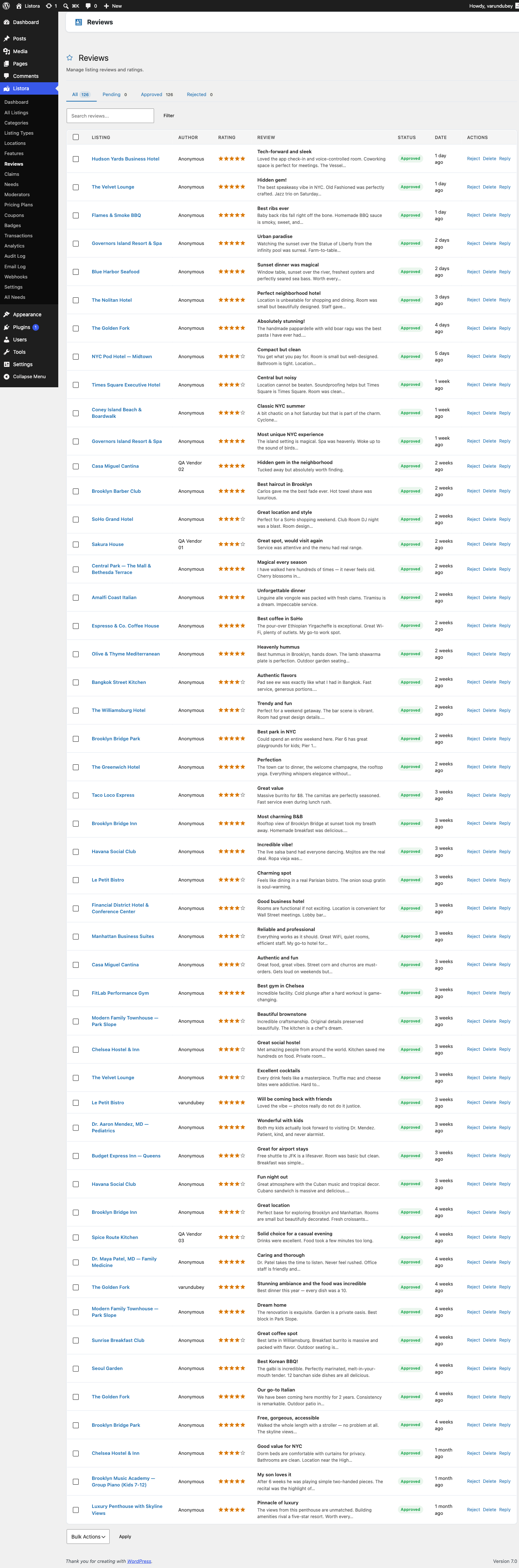
Three separate admin work queues - pending listings on All Listings (filtered by Pending), pending reviews on Listora > Moderation > Reviews, pending claims on Listora > Moderation > Claims, plus the Reports queue and photo-review uploads (Pro) - that share one consistent approve/reject/edit/bulk-action pattern. Per-row history is tracked everywhere; bulk-moderate (up to 100 IDs) is available via POST /listora/v1/listings/bulk-moderate. The architectural separation is intentional so capability gating stays clean per content type.
What it is
A directory's quality is the moderator's quality. Moderation has three different work queues that share one pattern:
- Pending listings - submissions with status
pendingwaiting for approval. Row actions on the All Listings admin page: Approve (transitions topublish), Reject (transitions tolistora_rejected, sends notification), Feature, Unfeature, Trash. - Pending reviews - reviews in
pendingstatus (set when moderation is enabled in Settings → Reviews → Require Approval). Same row actions: approve, reject, edit, delete. - Pending claims - business-claim requests in
pendingstatus. Approve transferspost_authorto the claimant; reject sends aclaim-rejectednotification. - Flagged content - any reviewer can flag a review as inappropriate; flags surface in their own queue for moderator action.
Bulk operations (since 1.2.0, updated):
The All Listings admin page now supports bulk actions natively through the standard WordPress Bulk Actions dropdown at the top of the table. Select multiple listings, choose an action, and click Apply:
| Bulk action | What it does |
|---|---|
| Approve | Transitions selected listings to publish, sending the listing-approved notification to each owner |
| Reject | Transitions to listora_rejected |
| Feature | Marks listings as featured (same as clicking the star on each row individually) |
| Unfeature | Removes featured status |
| Assign category | Opens a category picker; applies the chosen category to all selected listings |
The bulk action respects status-transition rules - a listing that cannot legally move to the target status (e.g., already published) is skipped. A summary notice after each bulk action reports how many succeeded and how many were skipped.
The REST equivalent is also available for programmatic use: POST /listora/v1/listings/bulk-moderate (approve, reject, feature, unfeature, or trash up to 100 IDs per call).
- The Reviews admin page supports the same row-level operations for reviews.
- Claims have a single-row workflow (approval triggers post-author transfer, not idempotent in bulk).
Moderator role (Pro):
- Pro adds a dedicated
listora_moderatorrole (see Moderator Role) - scoped to listing approval, review moderation, and claims management; cannot edit site settings. - Auto-assignment - Pro can round-robin assign new submissions to a pool of moderators (
listora_last_moderator_indexoption drives the rotation). - Moderator Queue block (Pro
listora-pro/moderator-queue) - surfaces all pending work in one frontend block, useful for a dedicated moderator dashboard page.
History + audit:
- Every moderation action fires an
wb_listora_after_*hook (e.g.wb_listora_after_update_claimwith$old_status,$new_status,$actor_id). - Pro's Audit Log records every action with actor + timestamp + before/after, so disputes are reconstructable.
How you use it
As a site owner - work the queue daily
- Listings: WP Admin → Listora → All Listings → filter by Pending. The list view shows row actions: Approve / Reject / Edit / Feature / Unfeature.
- Approve = one-click transition to
publish. Sends the listing-approved notification automatically. - Reject = one-click transition to
listora_rejected. Prompts for an optional rejection note that's included in the email.
- Reviews: Listora > Moderation > Reviews, then open Pending. Approve / Reject / Edit / Delete row actions.
- Claims: Listora > Moderation > Claims, then open Pending. Approve transfers
post_authorto the claimant and notifies; Reject sends a polite rejection. - Bulk: select multiple rows, pick an action from Bulk actions, and click Apply. The Reviews and Claims lists work like every other Listora list; see Admin Menu and Lists.
- Your Dashboard has a Needs attention box that links to each queue. See Admin Dashboard.
As a moderator (Pro role)
- Visit
/wp-admin/admin.php?page=listora-moderatorsfor the Moderators admin page (or the Moderator Queue block on the frontend if your site offers one). - Your view is scoped: you see only items assigned to you (when auto-assignment is on) or all pending items (when it's off).
- All your moderation actions are recorded against your user in the Audit Log - both for accountability and to surface stalled moderators to admins.
Configuration
- Require approval for new listings: Settings → Submission → Moderation → set to
manual(default) orauto(auto-publish - not recommended for public-submit directories). - Require approval for new reviews: Settings → Reviews → Require Approval.
- Auto-assignment to moderators (Pro): Settings → Moderators → Auto-Assign New Submissions.
Settings & options
| Setting | Location | Default | Notes |
|---|---|---|---|
| Listing moderation mode | Settings → Submission → Moderation | manual |
manual / auto |
| Review moderation | Settings → Reviews → Require Approval | On | When off, reviews go straight to publish |
| Bulk-moderate endpoint | POST /listora/v1/listings/bulk-moderate |
- | Up to 100 IDs per call |
| Claims approval flow | Listora > Moderation > Claims > Pending | Manual | Approves transfer post_author |
| Pro: moderator role | (auto-created on activation) | - | listora_moderator |
| Pro: auto-assignment | Settings → Moderators → Auto-Assign | Off | Round-robin via listora_last_moderator_index |
Developer hooks:
wb_listora_after_update_claim(action, 3 args) - fires on approve/reject; listen to push to CRM, Slack, etc.wb_listora_listing_status_changed(action) - fires on every listing transition; canonical signal for "a moderator did something".wb_listora_pro_moderator_assigned(action) - fires when Pro auto-assigns a submission to a moderator.
Related
- Reviews & Ratings - review moderation specifics.
- Business Claims - claim approval transfers
post_author. - Moderator Role (Pro) - the dedicated WP role for moderation.
- Audit Log (Pro) - every moderation action recorded.
- Spam Protection - first-line defence that keeps the queue manageable.