Audit Log
Pro feature. Available in Listora Pro.
Availability: Pro only. Requires Listora Pro.
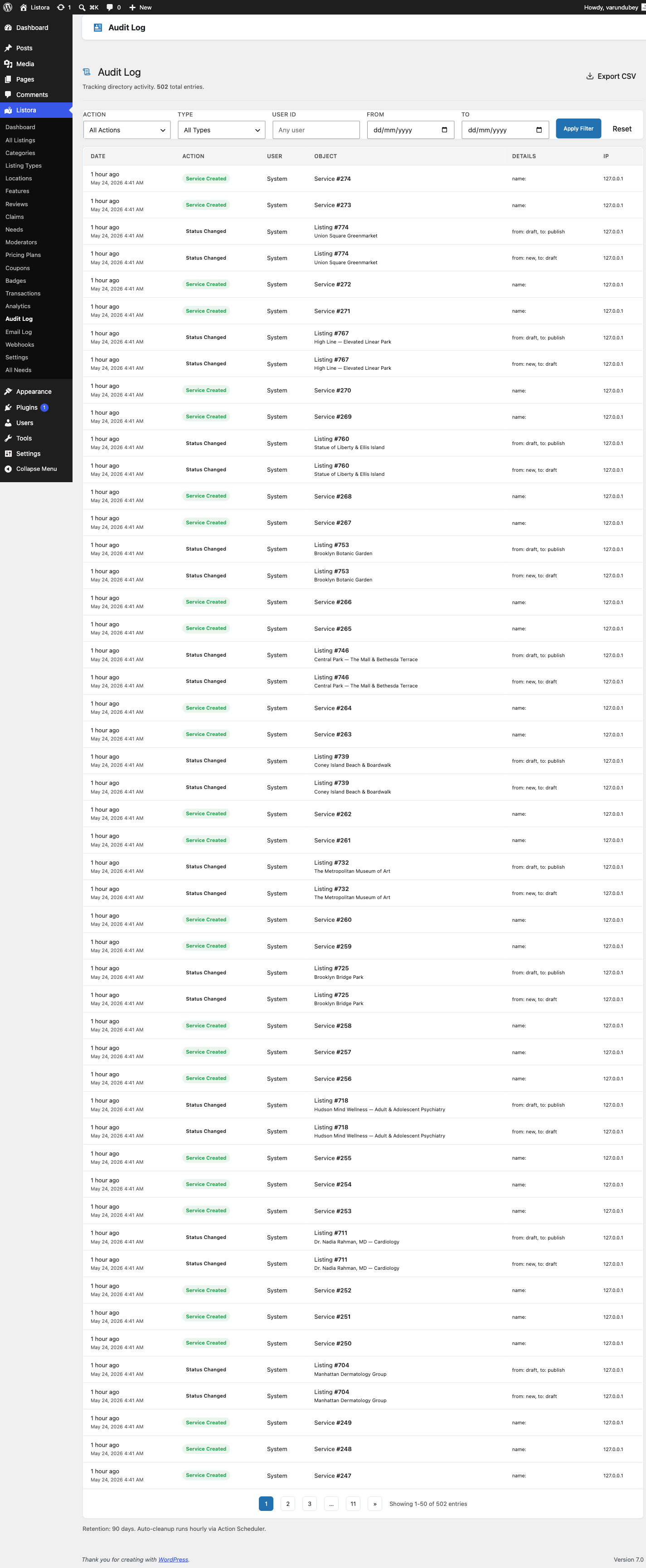
A searchable record of the meaningful actions in your directory: who created, edited, approved or deleted what, and when. Use it to investigate disputes, to show what happened on a listing, and to reconstruct a problem after the fact.
What it is
Every entry records who did it (or System when no one was signed in), what happened, what it happened to, when, the IP address, and the details of the change where there are any. Entries are stored in a dedicated table, so they outlive the item they describe.
Entries are recorded for:
| Group | What is recorded |
|---|---|
| Listings | Created, updated, deleted, approved, submitted, status changed, paused, resumed, renewed |
| Reviews | Created, updated, deleted, submitted |
| Claims | Submitted, approved, rejected, updated |
| Favourites | Added, removed |
| Services | Created, updated, deleted |
| Credits | Added, spent, refunded |
| Members | Suspended, reinstated |
| Badges | Assigned, removed |
| Settings | Settings changed |
| Webhooks | A payment webhook request that was refused |
How you use it
Reading the log
- Go to Listora → Tools → Audit Log. Only people who can manage Listora settings, such as administrators, can open it. The feature is on by default. You can switch it off under Listora → Settings → Features → Audit Log.
- The newest entries are at the top, 50 to a page. Columns are When, What happened, On, By and Details.
- Click the When column heading to sort oldest first. With no sort chosen the log always shows newest first.
- Where an entry recorded a change, the Details column lists the fields that changed. Open the row to see a Field, Before and After table.
Since 1.9.0 the log shows newest first when no sort is chosen. It used to come back in the wrong order.
Filtering
Use the filters above the table:
| Filter | What it does |
|---|---|
| Any action | Shows one kind of entry, such as Claim approved. The list holds only actions that are in your log. |
| Anything | Limits entries to one kind of item: Listings, Reviews, Claims, Services, Members, Credits, Webhooks or Settings. |
| Any time | Last 24 hours, Last 7 days, Last 30 days or Last 90 days. |
| Member name or email | Shows what one person did. |
Exporting
Click Export CSV at the top of the page to download the log as a CSV file.
Retention
Entries older than the retention period are removed automatically. The default is 90 days. An hourly job (wb_listora_pro_audit_cleanup, group wb-listora-pro) deletes up to 10,000 expired entries per run. The text under the page title shows the current period.
There is no screen for changing the period. Set the wb_listora_pro_audit_retention_days option, for example with WP-CLI:
wp option update wb_listora_pro_audit_retention_days 365
Export the log first if you need to keep entries longer than the period.
Settings and options
| Setting | Location | Default | Notes |
|---|---|---|---|
| Feature toggle | Listora → Settings → Features → Audit Log | On | |
| Retention period | wb_listora_pro_audit_retention_days option |
90 days | Days to keep entries. |
| Cleanup job | wb_listora_pro_audit_cleanup |
Hourly | Action Scheduler, group wb-listora-pro. Up to 10,000 rows per run. |
| Storage | listora_audit_log table |
- | Entries are stored in UTC and shown in your site's time zone. |
Developer API:
\WBListoraPro\Features\Audit_Log::log( $action, $object_type, $object_id, $details )- add your own entry. Entries with an action key Listora does not know show the key as their label.wb_listora_rest_prepare_audit_log_entry(filter) - change an entry in the REST response.
Related
- Outgoing Webhooks - send events to other systems as they happen.
- Developer Reference: Hooks