Features Toggles
The Features tab in Listora → Settings is your master switchboard for every Listora capability that can be turned on or off site-wide. Toggle a feature off and its code paths short-circuit before any user-facing surface renders - saves CPU, network, and screen real estate when a directory doesn't need a particular capability.
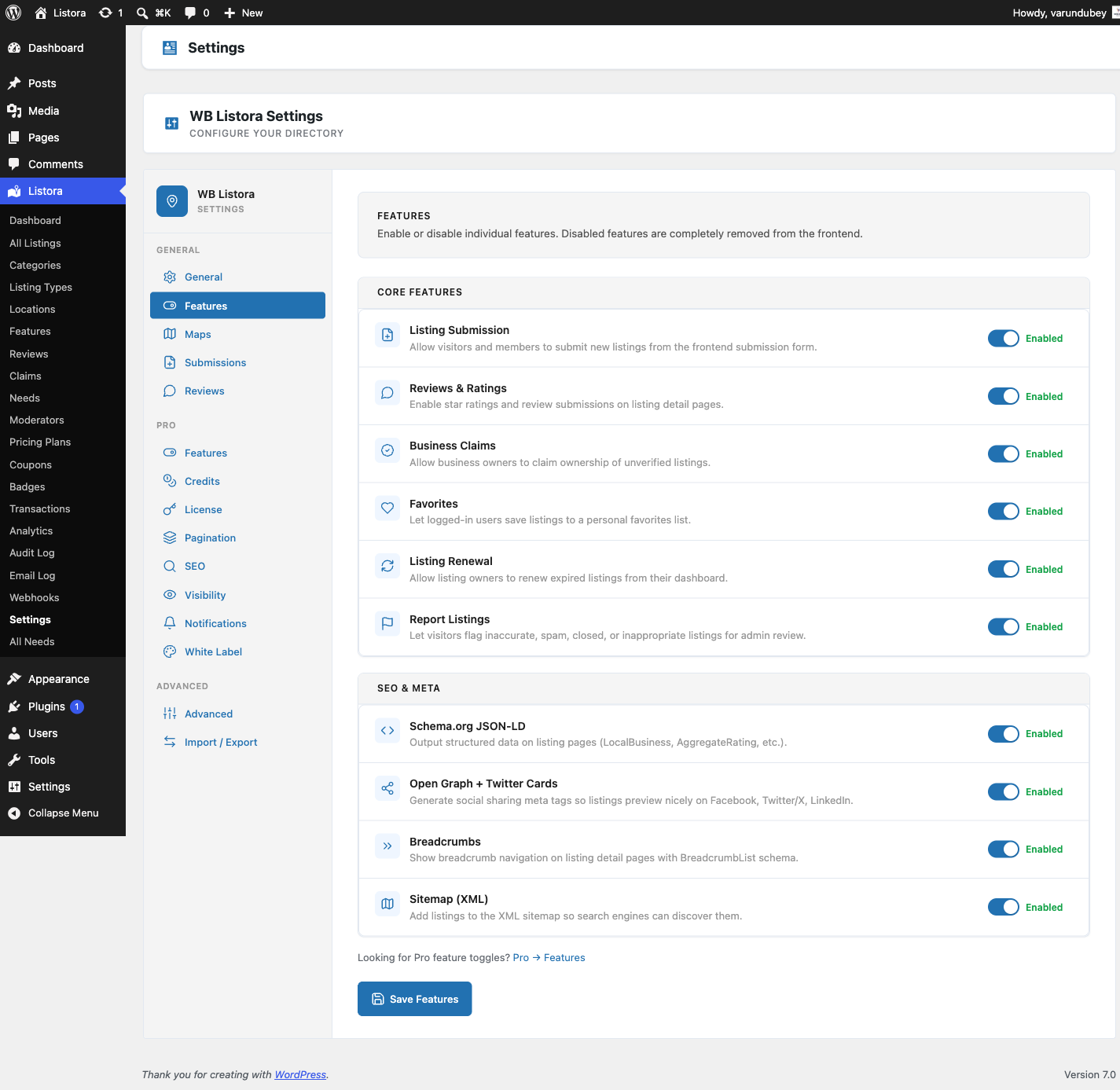
Where it lives
WP Admin → Listora → Settings → Features (?page=listora-settings&tab=features)
Requires the manage_listora_settings capability.
How it works
Every toggle is read via wb_listora_get_features() and gates the feature class's boot() method. When a toggle flips OFF:
- The feature's
init()hooks don't fire. - Its REST routes don't register (404 if hit directly).
- Its blocks unregister from the editor inserter.
- Its admin menu items disappear.
- Existing data is preserved - toggle back on and everything reappears with state intact.
Toggling does NOT delete listings, reviews, or settings. It's a render-time gate, not a destruction. If you need to wipe data, use Advanced → Uninstall + plugin deactivation.
Free features (grouped under Core Features)
| Toggle | What it gates | Default |
|---|---|---|
| Listing Submission | The listora/listing-submission block + /listora/v1/submit REST + the Add Listing page wiring |
On |
| Reviews & Ratings | Star ratings, written reviews, helpful votes, owner replies, the Reviews tab on listing detail | On |
| Business Claims | "Is this your business?" claim modal + /listora/v1/claims REST + admin Claims page |
On |
| Favorites | Heart icon on listing card / detail + /listora/v1/favorites REST + Favorites tab on user dashboard |
On |
| Contact Owner Form | The form that lets a visitor message a listing owner | On |
| Listing Renewal | Self-service renewal CTA on expired listings + the renewal REST endpoint + email reminders | On |
| Show Who Listed It | The name of the member who listed the entry, shown on the listing | On |
| Report Listings | "Report this listing" link on detail page + admin Reports queue | On |
SEO & Meta
| Toggle | What it gates | Default |
|---|---|---|
| Schema.org JSON-LD | Adds structured-data JSON-LD to every listing detail page | On |
| Open Graph + Twitter Cards | OG meta tags (including og:locale) for social-card preview |
On |
| Breadcrumbs | Breadcrumb navigation on listing detail and archive pages | On |
| Sitemap (XML) | Adds listora_listing posts to the WP Core sitemap (/wp-sitemap.xml) |
On |
When a known SEO plugin (Yoast SEO or Rank Math) is active, Listora defers head meta and Schema.org output to it so tags are never duplicated. The detection runs through the wb_listora_seo_plugin_active filter (since 1.1.0) - return true to force-declare an SEO plugin Listora does not auto-detect, or false to keep Listora injecting when your site routes meta through a custom layer.
Pro features (same Features screen)
Since 1.1.0, when Listora Pro is active its feature toggles register into this same Features screen - the separate Pro Features tab has been removed, so every feature is managed in one place. Pro toggles appear under their own category headings (Pro features, plus any category a Pro feature declares), and saving the Features screen persists both Free and Pro toggles together. Pro stores its values in the wb_listora_pro_features option; read state with wb_listora_pro_feature_enabled( 'feature_key' ).
Pro toggles that start off
On a fresh install these Pro features are off and must be switched on before they appear: Analytics, Outgoing Webhooks, Reverse Listings (Post a Need), Monetization (credits and paid plans), Photo Reviews, Saved Searches & Alerts, Programmatic SEO Pages and Infinite Scroll. Listing Comparison, Quick View, Lead Capture Form, Verification System, Custom Badges, Audit Log, Google Maps Provider, Multi-Criteria Reviews, BuddyPress Integration, White Label, Visibility Modes / Coming Soon and Notification Digest start on.
Monetization (Pro, since 1.2.0)
The Monetization toggle is new in 1.2.0 and is OFF by default on fresh installs. Enabling it activates the credit system, pricing plans, coupons, and the payment webhook receiver together. Disabling it hides the Credits tab from the user dashboard and removes the Plan step from the submission form.
Existing installs (upgraded from a version before 1.2.0) have this toggle set to ON automatically so nothing changes.
See Credits and Pricing Plans for setup instructions.
See each feature doc for details: Advanced Search, Analytics, Audit Log, BuddyPress Integration, Coming Soon, Compare Listings, Coupons, Credits & Plans, Digest Notifications, Google Maps, Infinite Scroll, Lead Forms, Moderators, Multi-criteria Reviews, Needs Marketplace, Outgoing Webhooks, Photo Reviews, Pricing Plans, Quick View, SEO Pages, Services per Listing, Verification Badges, White Label.
How to use
- Open Settings → Features.
- Flip a toggle. Each toggle has a one-line description directly under its label.
- Click Save Changes at the bottom of the tab. The page reloads with a Settings saved notice.
- Verify in the relevant UI - turn off Favourites and the heart icon should disappear from every listing card on the next page load.
There's no "Apply changes" delay - toggles take effect immediately. Caching layers (page cache, object cache) may need a flush if your stack aggressively caches block output.
Programmatic access
Read and write toggle state from your own code:
// Read.
$enabled = wb_listora_get_features(); // ['submission' => true, 'reviews' => true, ...]
$is_on = ! empty( $enabled['reviews'] );

// Write (admin context only - respects the same nonce + cap as the form).
update_option( 'wb_listora_features', array(
'submission' => true,
'reviews' => false, // hide reviews everywhere
'claims' => true,
'favorites' => true,
'renewal' => true,
'report_listings' => true,
'schema' => true,
'opengraph' => true,
'breadcrumbs' => true,
'sitemap' => true,
) );
For Pro toggles, swap wb_listora_features → wb_listora_pro_features and use wb_listora_pro_feature_enabled( 'feature_key' ) to read.
WP-CLI
There is no WP-CLI command to toggle features (Pro's previous wp listora-pro features list / toggle were never shipped). To script toggles, use wp option update wb_listora_features '...' --format=json.
Related
- Pro feature catalog - what every feature does.
- General Settings - site-wide options (slugs, page IDs, default listing type).
- Capabilities & Roles - who can edit features.
- Hooks reference - filters for runtime feature gating.