Reviews System
Availability: Free + Pro. 1-5 star ratings, written reviews, helpful votes, owner replies, and the report-a-review workflow are Free. Pro adds Multi-Criteria Reviews (per-aspect stars) and Photo Reviews (reviewers attach images).
What it does
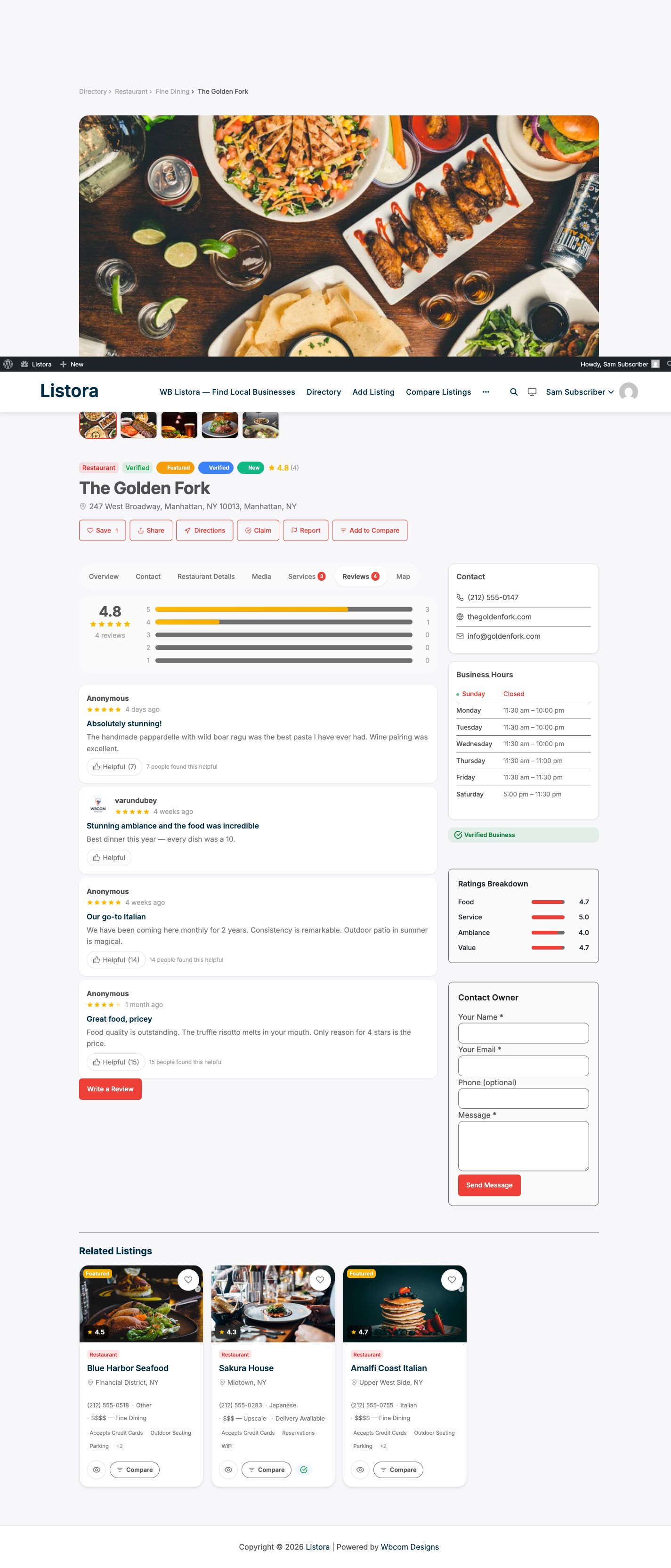
Listora includes a full review system. Visitors rate listings with 1-5 stars, write a review, vote on helpful reviews, report inappropriate ones, and read owner replies - all on the listing detail page without leaving the page.
Why you'd use it
- Star ratings and reviews build social proof for listed businesses.
- Owner replies show businesses are engaged, which keeps the directory active.
- Helpful votes surface the most useful reviews at the top.
- Moderation tools let you maintain quality without deleting all reviews manually.
How to use it
For site owners (admin steps)
- Go to Listora > Settings > Reviews to configure:
- Auto-approve - publish immediately or hold for moderation.
- Minimum length - the minimum number of characters in a review (0 allows star-only reviews).
- One review per listing - prevent duplicate reviews from the same user.
- Enable replies - let listing owners answer reviews in public.
- To moderate held reviews, go to Listora > Moderation > Reviews:
- Use All, Pending, Approved and Rejected. The list opens on Pending when something is waiting.
- Search by listing or review text. Filter by Any rating, Any listing type, Any time, Owner reply, or Reported or not.
- Bulk approve, reject or delete using the checkboxes and Bulk actions.
- Click Details on a row to see the whole review, the stars given for each criterion (for listing types with rating criteria), visitor reports, and the owner reply, before you approve or reject it.
- Reply is available only on approved reviews. A pending or rejected review is not public, so it cannot be answered. When owner replies are switched off in Settings > Reviews, the Details panel says so.
- Open the Reported by visitors filter to see reviews that were flagged.
- If another moderator already decided a review, Listora says so and leaves it as it was.
See Admin Menu and Lists for how the list works.
For end users (visitor/user-facing)
Submitting a review:
- Navigate to a listing detail page and click Write a Review.
- Select a star rating (1-5).
- Write your review title and text.
- If the listing type has multi-criteria ratings enabled (
Pro ), rate each criterion separately. - Click Submit. Depending on moderation settings, your review appears immediately or after admin approval.
If your review is waiting for approval, the listing tells you: You have already submitted a review for this listing. It is waiting for moderation and will appear once approved. The review form stays closed until the site team decides, so you do not write it twice.
Editing a review: If the site allows it, you can edit your review by clicking Edit next to your existing review.
Deleting a review: Click Delete on your own review to remove it.
Helpful votes: Click Helpful on any review to upvote it. The most helpful reviews rise to the top.
Reporting a review: Click Report to flag a review as inappropriate. Admins see flagged reviews in Listora > Moderation > Reviews.
Owner reply: If you own a listing, navigate to the listing's detail page or your User Dashboard → Reviews tab and click Reply next to any review. Your reply appears below the review, labelled "Owner Response." Only published (approved) reviews can be replied to.
Tips
- Enable One review per listing to prevent review manipulation - users can update their existing review instead of submitting duplicates.
- Use Auto-approve only if your directory has a small, trusted user base. For public directories, manual moderation is safer.
- Encourage listing owners to reply to reviews - directories with active owner replies see more review submissions.
- Multi-criteria reviews (Pro) let you define custom rating aspects per listing type. For example, restaurants get Food, Service, Ambiance, and Value; hotels get Rooms, Cleanliness, Service, Location, and Value. See Multi-Criteria Reviews.
- Photo reviews (Pro) let reviewers upload images. See Photo Reviews.
Common issues
| Symptom | Fix |
|---|---|
| Review form not visible | Verify the Listing Reviews block is on the detail page template, or that the Listing Detail block is present |
| Reviews stuck in Pending | Go to Listora > Moderation > Reviews and approve them manually, or enable auto-approve |
| Owner can't see the Reply button | Confirm the user is the listing author or has the moderate_listora_reviews capability |
| "One review per listing" not working | Clear your site cache - the duplicate check uses a database query that caching may bypass |