Search and Filters
Availability: Free + Pro. Keyword search, faceted filters, Near-Me geolocation, and "Search this area" are Free. Pro adds Advanced Search (custom field filters, saved alerts) and Infinite Scroll on results.
What it does
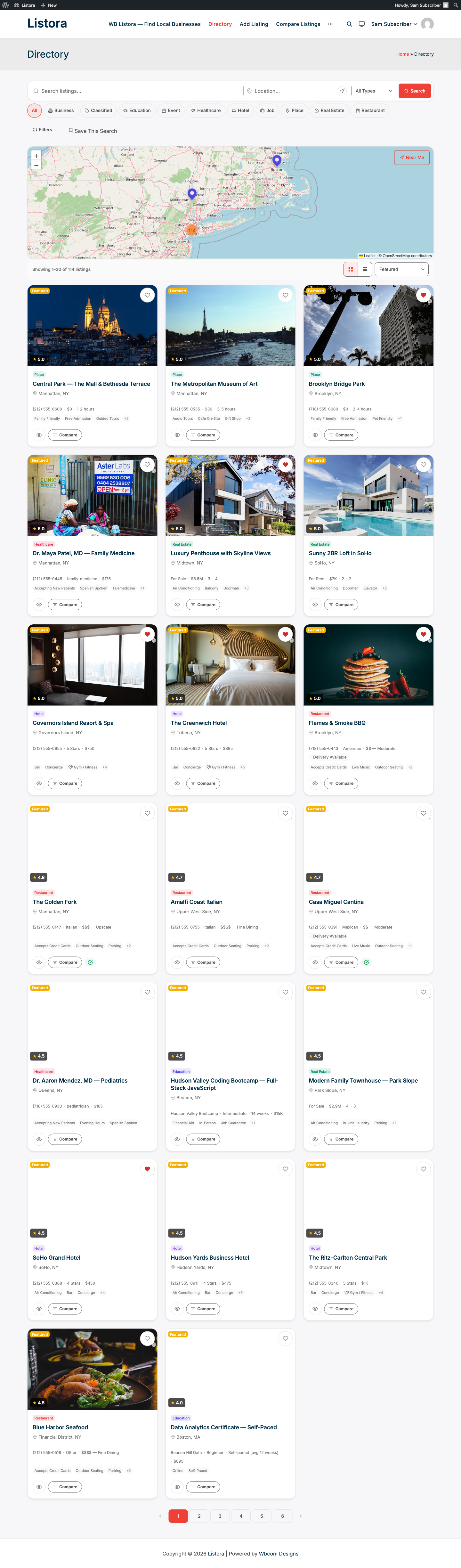
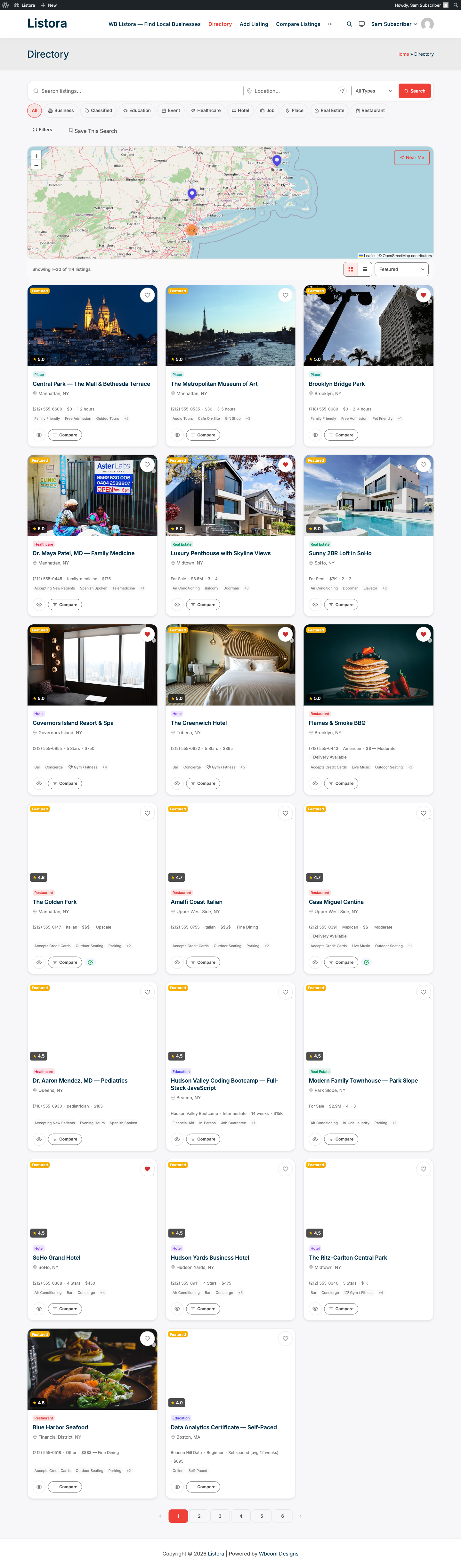
Listora's search system lets visitors find listings by keyword, type, category, location, and distance. It updates results reactively without reloading the page and supports geo-radius queries so users can find listings near them.
Why you'd use it
- Visitors find what they need without scrolling through hundreds of listings.
- Location-based search with "Near Me" geolocation reduces friction on mobile.
- Faceted filters (category, feature, price, rating) let users narrow results in any combination.
- Results stay fast at scale - Listora uses a dedicated search index table, not generic WordPress queries.
How to use it
For site owners (admin steps)
- Go to Listora → Settings → General. In Basics, set Listings per page (default 20) and Distance unit (Kilometers (km) or Miles (mi)). There is no Search tab. See Search Settings.
- Add the Listing Search block to your directory page. See Creating Your Directory Page.
- Select the Listing Search block. Under Search Settings in the sidebar, choose Default Sort (Featured, Newest, Rating, Distance or Relevance). You can also switch Layout to Stacked for a taller, full-width look suited to homepage hero sections.
For end users (visitor/user-facing)
Keyword search: Type any word into the search bar. Autocomplete shows matching listing names. Results search titles, descriptions, custom field values, and service names.
Location search: Type an address into the location field, or click Near Me to use your device's GPS. Results are filtered by distance from that point.
Type chips: The row of chips under the search bar is the type picker. Click All or a type (Restaurant, Hotel, and so on) to show only that type. When there are more chips than fit, the row scrolls and arrows appear at its ends. Only types that have published listings get a chip, and a type set to Draft is never shown.
Advanced filters: Click the filters button to expand the panel. Available filters depend on your listing types:
| Filter | Description |
|---|---|
| Category | Filter by listing category (e.g., Italian, French) |
| Features | Filter by amenity checkboxes (WiFi, Parking, etc.) |
| Price range | Minimum and maximum price slider |
| Rating | Minimum star rating |
| Geo-radius | Distance slider (requires a location to be entered) |
| Date range | Start and end date (for Event listing types only) |
Links you can share: The address of a search carries its filters, using names that start with listora_, for example ?listora_keyword=pizza&listora_type=restaurant&listora_category=italian&listora_location=boston and listora_page=2. These names no longer clash with a theme or another plugin that uses plain words like category or type in its own addresses, so a filtered link no longer ends on a "page not found". Older links that use the plain names keep working wherever no other plugin claims those names. Developers can read and build these with wb_listora_url_arg() and wb_listora_url_args(). REST parameters are unchanged.
Active filter pills: Applied filters appear as removable pills below the search bar. Click the × on any pill to remove that filter.
Sort options: Use the sort dropdown in the grid toolbar to change order:
- Featured (the default)
- Newest
- Highest Rated
- Price: Low to High
- Price: High to Low
- Most Reviewed
- A to Z
- Nearest (appears when the results have distances, for example after a location search)
Tips
- Add the Listing Map block alongside the grid to let users see results geographically while filtering - the map updates with the same filters.
- The geo-radius filter only activates once the user enters a location or clicks Near Me. Without a location, the radius slider is hidden.
- For event directories, the date filter is specific to the Event listing type. Configure date fields in Listora → Listing Types → Event.
- Saved Searches (Pro) let logged-in users save any filter combination and receive email alerts when new matching listings are published. See Saved Searches.
- Re-indexing: if you bulk-import listings and search results don't reflect them, go to Listora → Settings → Advanced and click Rebuild Search Index under Maintenance.
Common issues
| Symptom | Fix |
|---|---|
| Keyword search returns no results | Rebuild the search index: Listora → Settings → Advanced → Rebuild Search Index |
| "Near Me" button does nothing | The user's browser must allow location access; HTTPS is required |
| Distance filter not appearing | A location must be entered in the location field first |
| Date filter missing | Confirm the listing type has date fields configured in Listora → Listing Types |