Listora Documentation
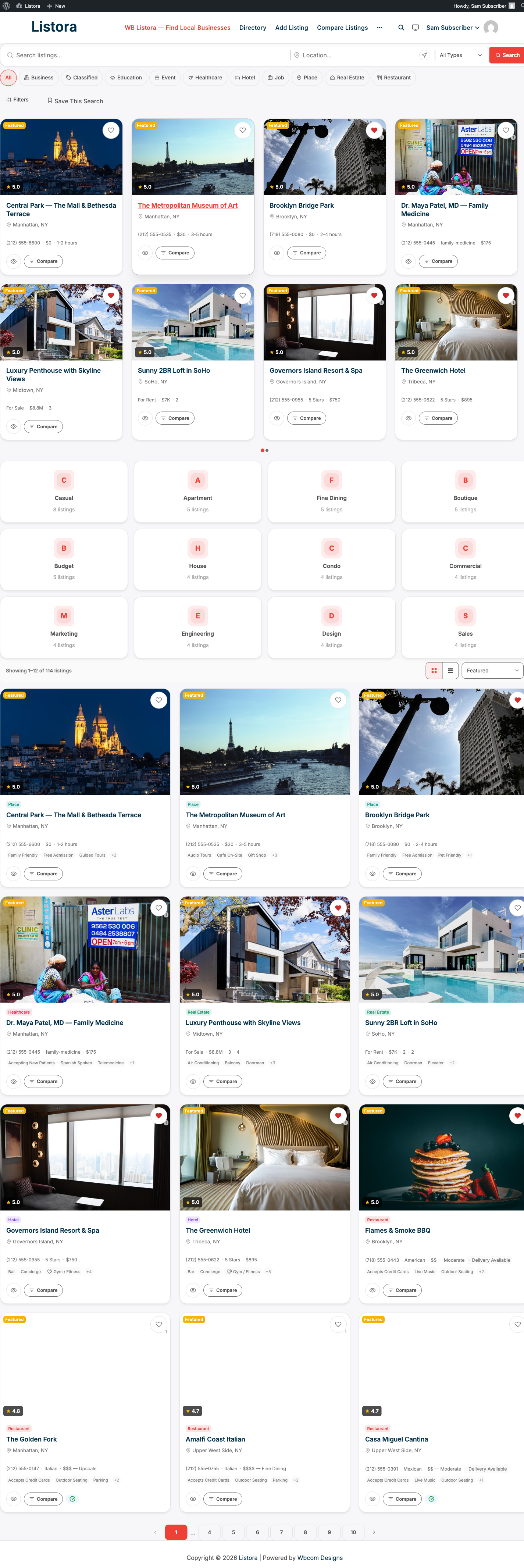
Listora is a complete WordPress directory plugin. Build any type of listing directory - business, restaurant, hotel, real estate, jobs, events, and more - using native Gutenberg blocks and the WordPress Interactivity API.
Single listing page
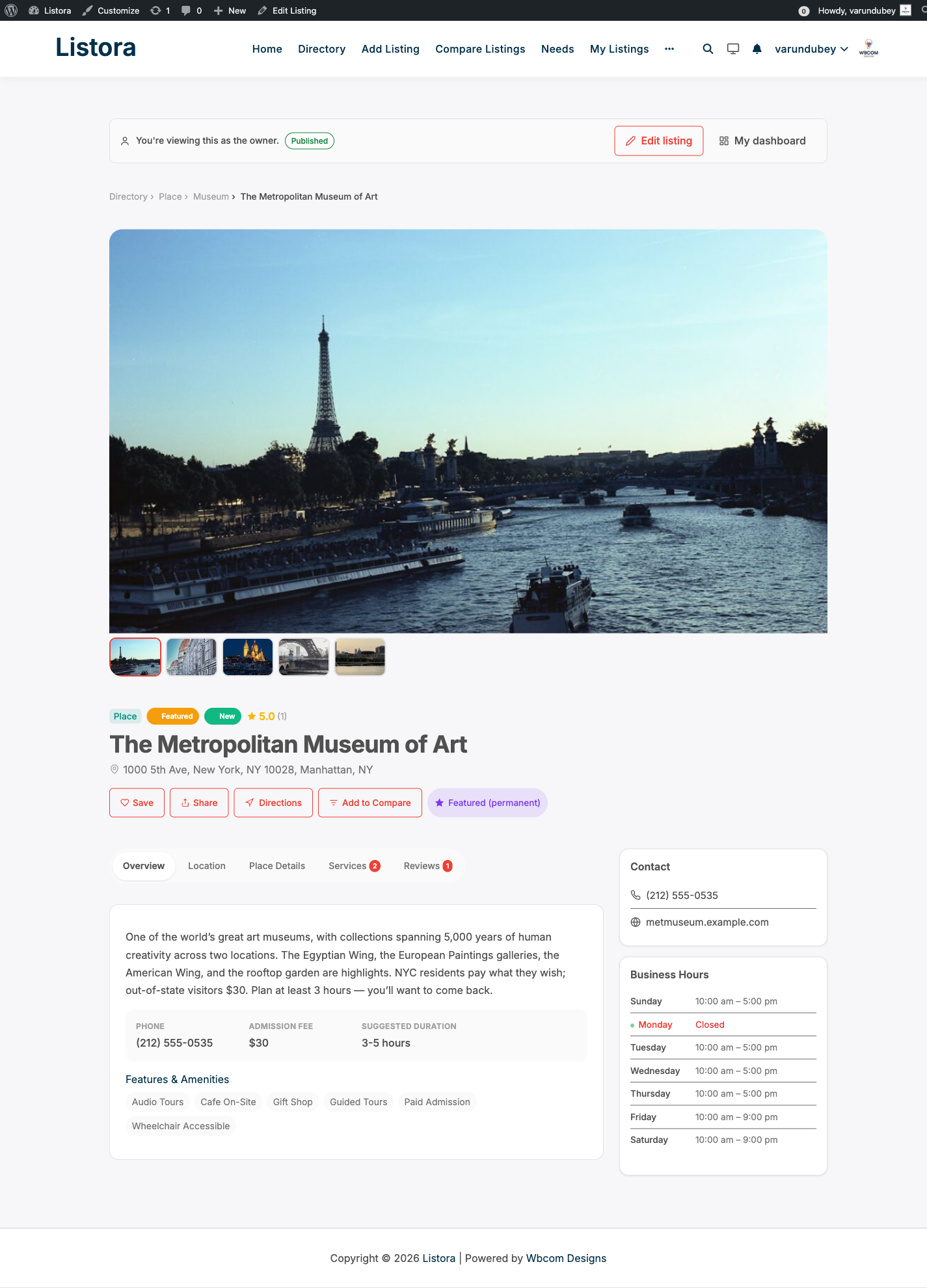
Each listing renders with a uniform tabbed layout: Overview, Location (with embedded map), Place Details, Services, and Reviews. Empty tabs are suppressed automatically. The gallery, ratings, save / share / directions actions, and a sidebar with contact info + business hours sit alongside.
Editing listings in wp-admin
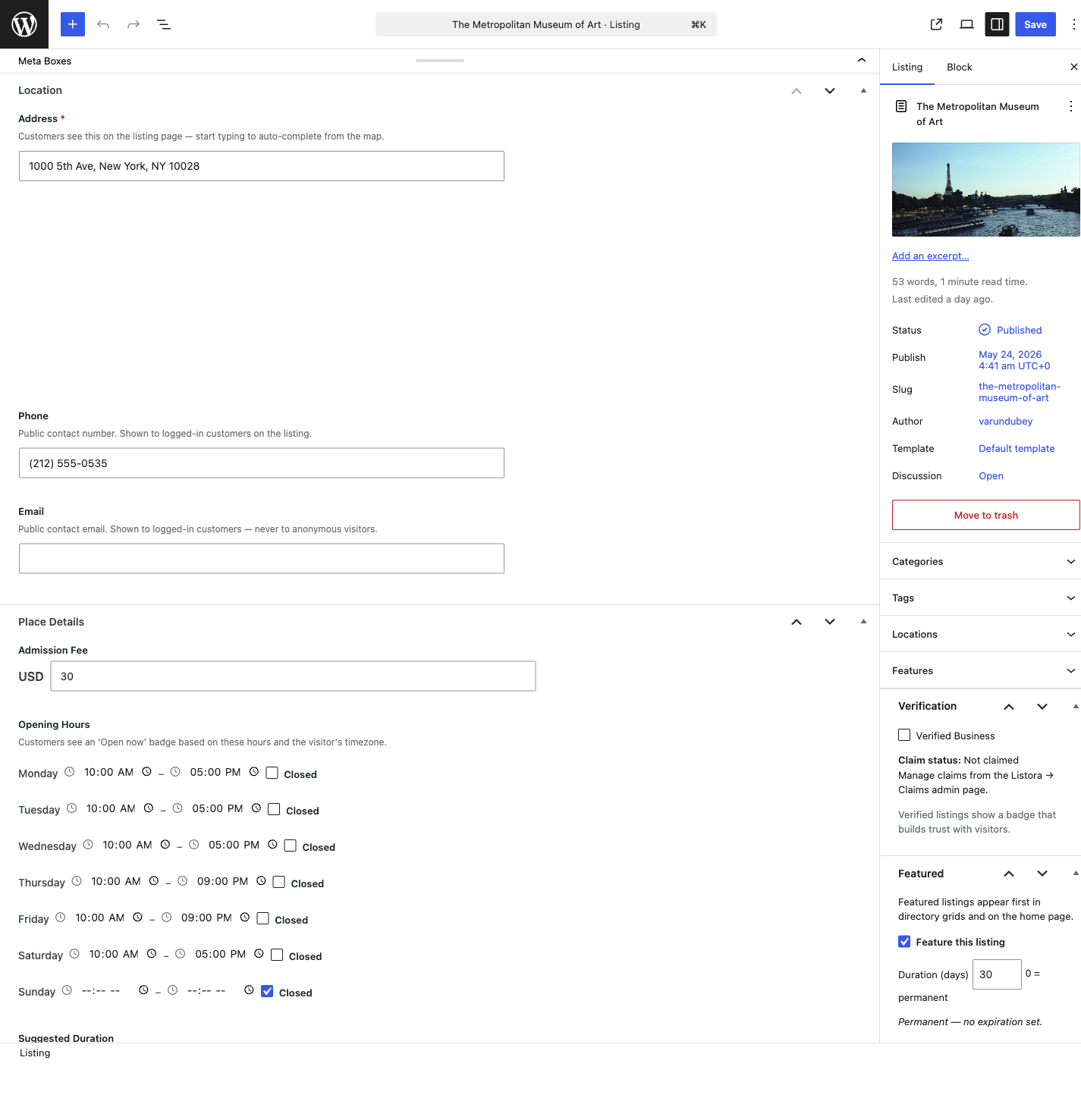
Site admins and editors edit every listing field directly from the WordPress edit screen. The edit page now exposes a meta box per type-defined field group (Location, Place Details, Media, Services) alongside the existing Verification, Featured, and Badges boxes. No more switching to the frontend submission wizard to change a phone number or business hour.
This documentation covers both Listora Free and Listora Pro. Pages that document Pro-only features are marked with a Pro feature callout at the top. Browse by what you're trying to do:
Find the docs you need by role
Setup & Configuration
"How do I install and configure my directory?"
Start here if you're standing up a new directory. Covers installation, the setup wizard, your first directory page, listing types, Pro activation, and every settings tab.
For Site Owners
"How do I run my directory day-to-day?"
Moderating reviews, approving claims, managing moderators (Pro), tracking analytics (Pro), running coupons (Pro), awarding verification badges (Pro), coming-soon mode (Pro), white-label (Pro).
For Listing Owners
"How do I add and manage my listings?"
Submitting a listing from the frontend, the user dashboard, adding services, and (Pro) buying credits to activate listing plans.
For Visitors
"How do I find what I need and engage with listings?"
Search and filters, saving favorites, saved-search alerts (Pro), writing reviews (incl. multi-criteria and photo reviews on Pro), contacting owners via lead forms (Pro), comparing listings (Pro), posting needs to the reverse marketplace (Pro).
Maps
"How do I use maps in my directory?"
OpenStreetMap on Free (no API key), Google Maps on Pro (Places autocomplete, marker clustering).
→ Maps
Migration & Import
"How do I move from another directory plugin?"
Step-by-step guides for migrating from Directorist, GeoDirectory, Business Directory Plugin, and ListingPro.
Developer Reference
"How do I extend or integrate with Listora?"
The 11 Free + 5 Pro Gutenberg blocks, every action and filter hook, the complete REST API contract, custom-field types, and the Pro extension surface.
Setup & Configuration
Bring your directory online in under an hour.
| What you do | Guide |
|---|---|
| 1. Install Listora | Installation & Activation |
| 2. Run the setup wizard | Setup Wizard |
| 3. Create your directory page | Creating Your Directory Page |
| 4. Define listing types (Restaurant, Hotel, etc.) | Understanding Listing Types |
| 5. (Pro) Install and activate Listora Pro | Installing Listora Pro |
| 6. (Pro) Activate your license key | License Management (Pro) |
| Configure global behaviour | General Settings |
| Tune search behaviour | Search Settings |
| Configure submission & moderation | Submission & Moderation Settings |
For Site Owners
Day-to-day operation of your directory.
| What you do | Guide |
|---|---|
| Manage star ratings, written reviews, helpful votes, replies | Reviews & Ratings |
| Approve or reject business claim requests | Business Claims |
| (Pro) Assign trusted team members as moderators | Moderator Role (Pro) |
| (Pro) Track views and clicks per listing | Analytics (Pro) |
| (Pro) Create discount codes for listing plans | Coupons (Pro) |
| (Pro) Award verified badges to vetted businesses | Verification Badges (Pro) |
| (Pro) Hide the directory while setting up, or run a members-only directory | Coming Soon & Private Mode (Pro) |
| (Pro) Rename the plugin for client handoff | White Label (Pro) |
| (Pro) Batch notifications into a daily digest | Digest Notifications (Pro) |
For Listing Owners
Adding and managing your own listings.
| What you do | Guide |
|---|---|
| Submit a listing from the frontend | Submitting a Listing |
| Manage your listings, reviews, favorites from one place | User Dashboard |
| Add a service catalog to your listing | Services on Your Listing |
| (Pro) Purchase credits and activate a listing plan | Credits & Pricing Plans (Pro) |
For Visitors
Finding what you need and engaging with listings.
| What you do | Guide |
|---|---|
| Search, filter, narrow by geography | Search & Filters |
| Save listings to revisit | Favorites |
| (Pro) Save a search and get daily email alerts when new matches arrive | Saved Searches (Pro) |
| Write a review (star rating + text) | Reviews & Ratings |
| (Pro) Rate per criterion (Food, Service, Ambiance for restaurants etc.) | Multi-Criteria Reviews (Pro) |
| (Pro) Attach photos to your review | Photo Reviews (Pro) |
| (Pro) Contact a listing owner via a Contact form | Lead Forms / Contact Owner (Pro) |
| (Pro) Compare listings side by side | Documentation in progress - see Comparison block |
| (Pro) Post what you need; businesses respond | Needs Marketplace (Pro) |
Maps
Maps in Listora work on both Free and Pro - the difference is the provider.
| What you do | Guide |
|---|---|
| Use OpenStreetMap (no API key required) | OpenStreetMap (Free) |
| (Pro) Replace OSM with Google Maps + Places autocomplete + clustering | Google Maps (Pro) |
Migration & Import
Moving from another directory plugin?
Developer Reference
Build on top of Listora.
| What you need | Guide |
|---|---|
| Block-by-block overview (11 Free + 5 Pro blocks) | Gutenberg Blocks Overview |
| Every action and filter hook | Hooks Reference |
| Full REST API contract | REST API |
| Define your own field types | Custom Fields & Field Types |
| Extend the Free plugin from Pro or a third-party add-on | Extending with Listora Pro |
Also useful
- Feature Catalog - every feature on one page, with tier (Free / Pro) and audience.
- Why Listora? - what makes it different from competitors.
- Plugin Comparison - side-by-side vs other directory plugins.