Import & Export
Availability: Free + Pro. Pro adds the visual bulk importer (mapping UI) and Google Places import.
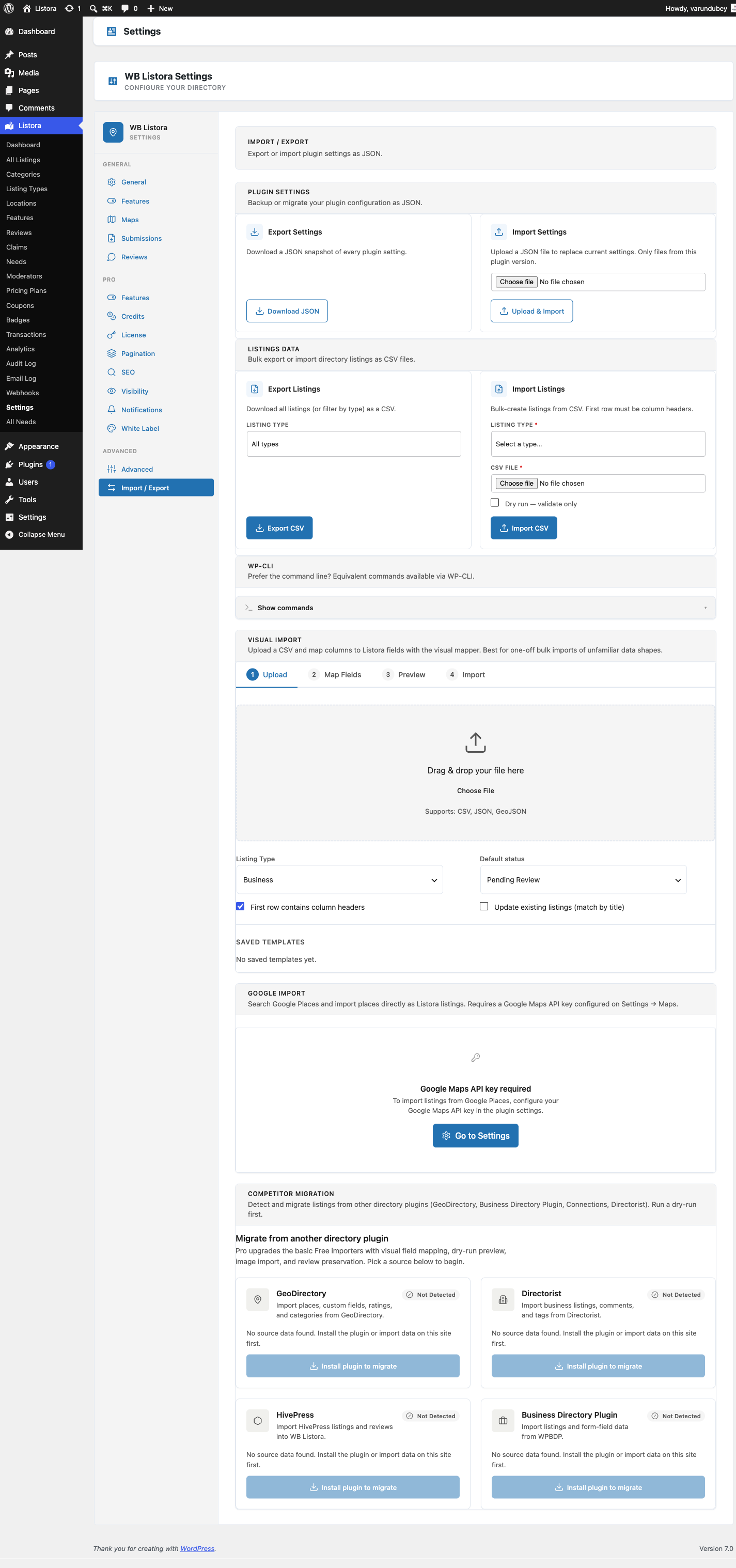
Bulk-import listings from CSV, JSON, or GeoJSON files, and bulk-export your directory in the same formats. Plus competitor migrators for the five most common WordPress directory plugins (GeoDirectory, Directorist, BDP, ListingPro, HivePress) - read their data straight from the database and convert to Listora listings, no manual export step required.
Since 1.2.0, demo-pack and large CSV imports run in the background on Action Scheduler rather than as a single slow request - you can close the browser tab and return later.
What it is
Three integrated flows live under one Settings tab:
1. Universal file importers (CSV / JSON / GeoJSON)
- CSV importer (
Csv_Importer) - pick a file, map source columns to Listora fields in a visual mapper, optionally skip the header row, preview the first 10 rows, run the full import. Defaults toskip_first_row = truefor CSV. - JSON importer - accepts an array of listing objects with title/type/lat/lng/fields keys.
- GeoJSON importer - accepts a standard FeatureCollection; each feature becomes a listing with geometry →
lat/lng+ properties → fields.
Each importer:
- Streams the file (10MB+ files run without exhausting memory)
- Validates required fields before writing
- Reports per-row errors so partial imports don't fail silently
- Writes one batch at a time (default 100 listings/batch)
2. Background imports (since 1.2.0)
Files larger than a small threshold (or any demo-pack import) run as a background job on Action Scheduler instead of blocking the request. This means:
- You can upload a 5,000-row CSV, start the import, and close the browser tab. Listora processes it in the background.
- A progress widget on the Settings page shows the current run status (queued, running, done, or failed), how many rows have been processed, and how many remain.
- If a batch fails, Listora retries it automatically. After three consecutive failures on the same chunk, the run is marked as failed - that is the terminal state (it will not silently continue or overwrite itself with a success status).
- Every row is fingerprinted before writing, so retrying a partially completed import never creates duplicate listings.
- The search index rebuilds automatically once the final batch completes.
Checking import progress:
Go to Listora → Settings → Tools and look for the import progress widget. It updates while a run is active. For CLI access: wp listora import:status {run_id}.
What "failed" means:
If the progress widget shows "failed", the import stopped after too many consecutive errors on the same batch. The rows processed before the failure remain in your directory. Check your server's PHP error log for the specific error, then re-run the import for the unprocessed rows.
3. Competitor migrators (database-direct)
Five WordPress directory plugins are supported with database-direct readers - no need to export from the source plugin first:
| Source plugin | Migrator class | What it reads |
|---|---|---|
| GeoDirectory | Geodirectory_Migrator |
gd_place_detail + custom post types + taxonomies |
| Directorist | Directorist_Migrator |
at_biz_dir posts + Directorist meta keys |
| Business Directory Plugin (BDP) | Bdp_Migrator |
BDP custom tables + WP posts |
| ListingPro | Listingpro_Migrator |
listing post type + ListingPro meta |
| HivePress | Hivepress_Migrator |
hp_listing CPT + vendor ownership resolution (since 1.2.0) |
All five extend a common base (Migration_Base) so the conversion logic (terms, addresses, custom fields) is shared. Each migrator's mapping decisions are documented at audit/architecture/competitor-schemas/{slug}.md in the plugin repo - every field's destination is verified, no guessing.
4. CSV exporter
Csv_Exporterproduces a CSV of the full directory or any filtered slice (by type, by category, by date range, by status). Includes core fields + custom fields + lat/lng.- One-click export from the admin tab; WP-CLI equivalent for scripting:
wp listora export --type=restaurant --output=file.csv.
How you use it
Import a CSV
- Listora → Settings → Tools tab (or Import/Export depending on settings layout).
- Click Choose File → pick your CSV. (For files >10MB, use the WP-CLI command instead.)
- Listing Type - pick which type to assign rows to (or leave blank if rows include their own
typecolumn). - Field mapping - for each source column, pick the destination Listora field. The mapper auto-detects exact-name matches; only unmatched columns need manual selection.
- Preview first 10 rows.
- Run import. For large files, the import queues as a background job and a progress widget appears. For small files (roughly 10 listings or fewer), it completes inline.
Migrate from a competitor
- Install the source plugin in the same WordPress (don't delete it yet).
- Listora → Settings → Tools → Migrate → pick the source plugin.
- The migrator runs in batches; progress shows N of M source rows. Existing Listora listings (matched by title + lat/lng) are not duplicated if you re-run.
- After migration completes, verify a sample of listings on the front-end.
- Deactivate the source plugin once you're confident migration is complete.
WP-CLI alternative
# Import
wp listora import file.csv --type=restaurant --batch-size=200

# Export
wp listora export --type=restaurant --output=restaurants.csv
wp listora export --status=publish --output=full-directory.csv

# Migrate
wp listora migrate --from=geodirectory --dry-run # preview only
wp listora migrate --from=geodirectory # run for real
wp listora migrate --from=hivepress    # HivePress (since 1.2.0)
WP-CLI is recommended for >10K rows since it bypasses the admin UI's PHP max_execution_time constraint.
Settings & options
| Tool | Class | Notes |
|---|---|---|
| CSV import | Csv_Importer |
Streaming, batched, header-skip default on |
| JSON import | Json_Importer |
Array of listing objects |
| GeoJSON import | Geojson_Importer |
FeatureCollection |
| CSV export | Csv_Exporter |
Full or filtered |
| GeoDirectory migrator | Geodirectory_Migrator |
DB-direct |
| Directorist migrator | Directorist_Migrator |
DB-direct |
| BDP migrator | Bdp_Migrator |
DB-direct |
| ListingPro migrator | Listingpro_Migrator |
DB-direct |
| HivePress migrator | Hivepress_Migrator |
DB-direct (since 1.2.0) |
Developer hooks:
wb_listora_import_row(filter) - transform a row before persisting; useful for data cleanup, custom field mapping, conditional rejection.wb_listora_export_row(filter) - transform a row before writing to CSV/JSON.wb_listora_get_migrators(filter) - register a custom competitor migrator. See Migrate from another plugin for details.