Email Templates
Availability: Free + Pro. Free ships a template for every Free email (claims, listings, reviews and reminders). Pro adds templates for credits, needs and responses, leads, saved-search alerts, the digest and moderator reassignment. The full lists are at the end of this section.
One Free template, Listing Verify Email, is configurable but cannot currently send: its only trigger is the guest-submission email-verification path, which has been switched off since guest submission was removed. It is listed in the Email Templates screen and can be previewed and test-sent, but no listing on any install reaches the state that fires it. So every other Free template can reach a customer, and this one cannot.
Every customer-facing email - listing approved, review received, helpful-vote milestone, draft reminder, claim accepted - is rendered from a themeable PHP template with a shared header/footer, a unified token palette, and a single notifications class that pipes data into the template. Themes override templates the WooCommerce way: copy the file into {theme}/wb-listora/emails/ and edit.
What it is
Plugins that hardcode emails ship inconsistent designs across notifications. Listora's email system is a small design system in its own right:
- Shared partials -
templates/emails/parts/header.phpandparts/footer.phpare included by every template, so the wordmark, color palette, GDPR footer, and unsubscribe link all live in one place. - Tokenized palette -
Notifications::get_palette()resolves the colors once per send (primary, success, warning, danger, neutral, text, text_muted, bg_alt, border, white). Templates read$colors['primary'], never hardcoded hex. - Variant resolver - each event picks a tone (
success/warning/danger/neutral) viaNotifications::resolve_variant(), applied to the header band and CTA button. Templates carry no conditional color logic. - Plain-text fallback -
phpmailer_initAltBody filter generates a text version so clients that prefer plain text still get a readable message. - GDPR-friendly footer - marketing emails (
$is_marketing = true) carry an$unsubscribe_url; transactional emails skip it. - Theme overrides - every template runs through
wb_listora_locate_template(); drop a file at{theme}/wb-listora/emails/{name}.phpand it wins over the plugin's copy. - WPML / Polylang ready - every string is wrapped in
__()against the plugin text domain;make-potextracts them.
The Free templates (in wb-listora/templates/emails/):
claim-approved, claim-rejected, claim-submitted, draft-reminder, listing-approved, listing-expired, listing-expiring-soon, listing-pending-admin, listing-rejected, listing-renewed, listing-reported, listing-submitted, listing-verify-email, review-helpful, review-received, review-reminder, review-reply.
Pro adds (in wb-listora-pro/templates/emails/):
credits-low, credits-purchase-refunded, credits-refunded, digest, lead-notification, listing-paused, listing-resumed, moderator-reassigned, need-approved, need-expired, need-match, need-pending-mod, need-rejected, need-response, need-updated, response-accepted, response-closed, response-rejected, saved-search-alert. See Pro Emails for what triggers each one.
How you use it
As a site owner - change the wording
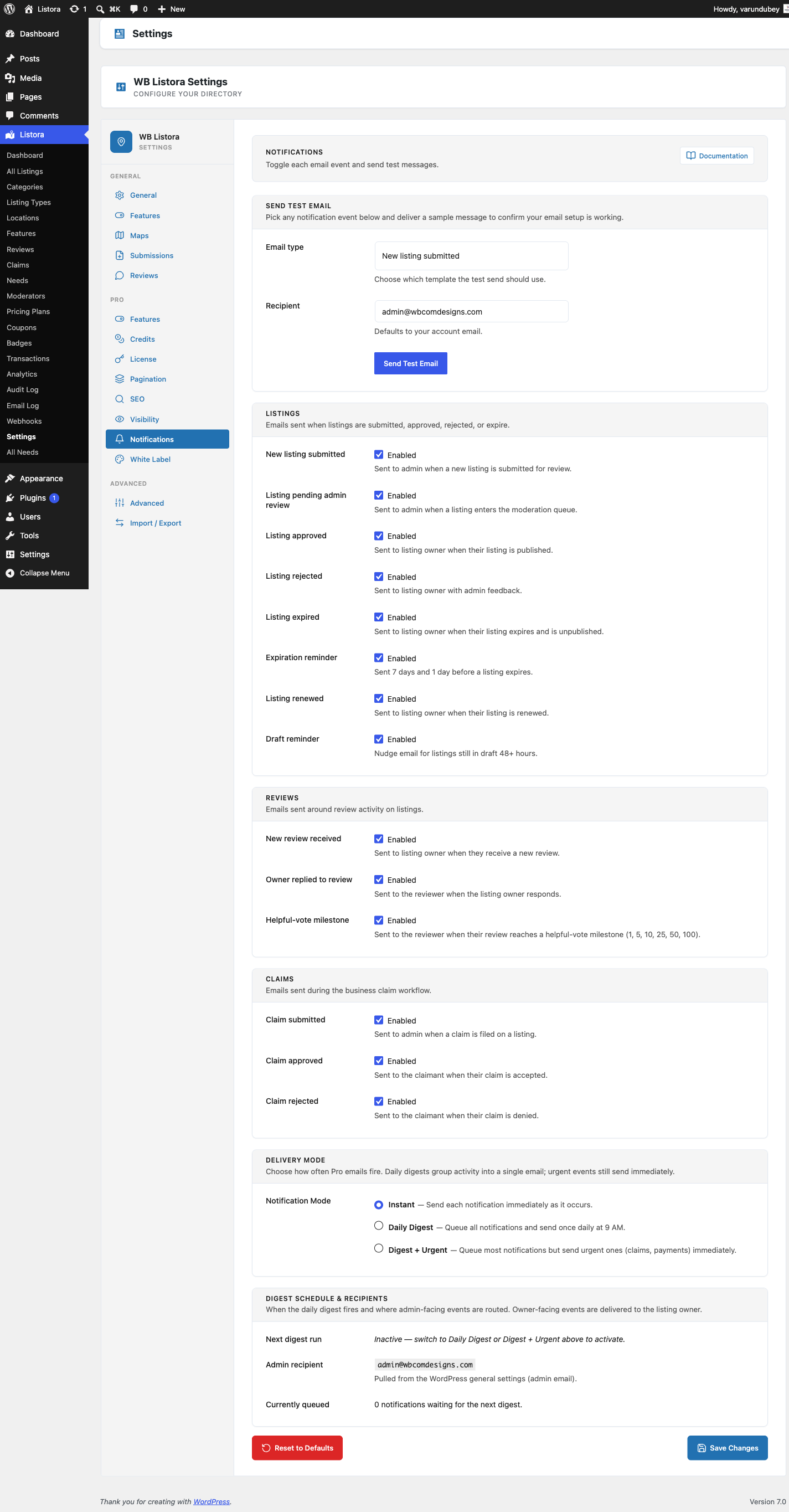
- Go to Listora > Settings > Notifications.
- Click Edit template on the email you want to change.
- Edit the Subject and Message, using the placeholders listed under the fields.
- Click Preview to see it with sample details, and Send test email to send it to yourself.
- Click Save Changes.
See Notifications Settings for the full walkthrough. The logo, footer text and sender name are not settings. Change them in code with the wb_listora_email_logo_url, wb_listora_email_footer_text and wb_listora_email_from_name filters.
As a developer - theme override
Themes shipping a directory layout often want their own email skin:
- Copy the template you want to change from the plugin (e.g.
wp-content/plugins/wb-listora/templates/emails/listing-approved.php) to your theme:wp-content/themes/{your-theme}/wb-listora/emails/listing-approved.php. - Edit the copy. Variables passed in (documented at the top of every template):
$site_name,$site_url,$logo_url,$footer_text- Per-event:
$listing_title,$listing_url,$author_name,$dashboard_url, … $colors(palette array),$variant(success/warning/danger/neutral)$is_marketing,$unsubscribe_url(GDPR fields)
- Save. The next outbound email of that type uses your override.
Filter hooks for non-template tweaks
wb_listora_email_subject(filter) - modify any subject. Event-scoped variant:wb_listora_email_subject_{event}.wb_listora_email_content(filter) - modify the rendered HTML body. Event-scoped:wb_listora_email_content_{event}.wb_listora_email_recipients(filter) - add CC/BCC; e.g. send admin a copy of every approval.wb_listora_email_headers(filter) - modifywp_mail()headers (Reply-To, custom X-headers).wb_listora_email_logo_url/wb_listora_email_footer_text(filter) - programmatic overrides for the header logo + footer text.
Settings & options
| Setting | Location | Default | Notes |
|---|---|---|---|
| Email on or off | Settings > Notifications, the switch on each row | On | A switched-off email is not sent |
| Subject and message | Settings > Notifications > Edit template | Built-in text | Leave blank to keep the built-in text |
| Preview | Settings > Notifications > Preview | - | Uses your saved wording, sends nothing |
| Test send | Settings > Notifications > Send a test email | - | Any email, any address |
| Logo, footer text, sender name | Filters only | Site name and no logo | wb_listora_email_logo_url, wb_listora_email_footer_text, wb_listora_email_from_name |
Template lookup order (Free + Pro share the same locator):
{stylesheet}/wb-listora/emails/{name}.php{template}/wb-listora/emails/{name}.php(parent theme)- Plugin default
Related
- Digest Notifications (Pro) - batch transactional emails into a daily digest to reduce inbox noise.
- Reviews & Ratings - drives
review-received/review-reply/review-helpfulnotifications. - Frontend Submission - drives
listing-submitted/listing-approved/listing-rejected. - Draft Reminder (Free) - twicedaily cron-driven recovery email for incomplete drafts.
- Developer Reference: Hooks - full list of email-related filters.