Analytics
Availability: Free + Pro. Free tracks listing views (since 1.2.0); Pro adds click-event tracking and the full Analytics dashboard.
Free-tier view tracking (since 1.2.0)
Listora Free now tracks page views for every listing automatically - no Pro required, no configuration needed.
What you get on Free:
- A Views count on each listing's row in the admin listings table (Listora → All Listings).
- View counts on the listing owner's User Dashboard under My Listings.
- A
viewsfield on the listing REST response.
View tracking is bot-filtered (known crawler user-agents are excluded) and rate-limited per visitor per listing to avoid inflation from page refreshes. Your own views as a site admin are not counted.
Deferral to Pro: If Listora Pro is active with its Analytics feature turned on, Pro owns view recording and the Free tracker steps aside. Both write to the same listora_analytics table, so the numbers are consistent whether you upgrade later.
Pro analytics
Pro feature - requires Listora Pro. Pro adds click-event tracking, the Analytics screen and the member Analytics tab.
Turn it on at Listora → Settings → Features → Analytics. It is off until you do. Once on, Pro tracks views and engagement clicks on every listing without cookies or third-party scripts. Listing owners see their own numbers in their dashboard. You see the whole directory in the admin.
Why you'd use Pro analytics
- Listing owners get data on how their listing performs, which gives them a reason to keep it updated and renew their plan.
- You can spot listings that get visits but no contact clicks.
- Click events (phone, website, email, directions) show real engagement, not just passive views.
- Privacy-safe: no personal data is stored, only daily counts.
How to use it
For site owners (admin steps)
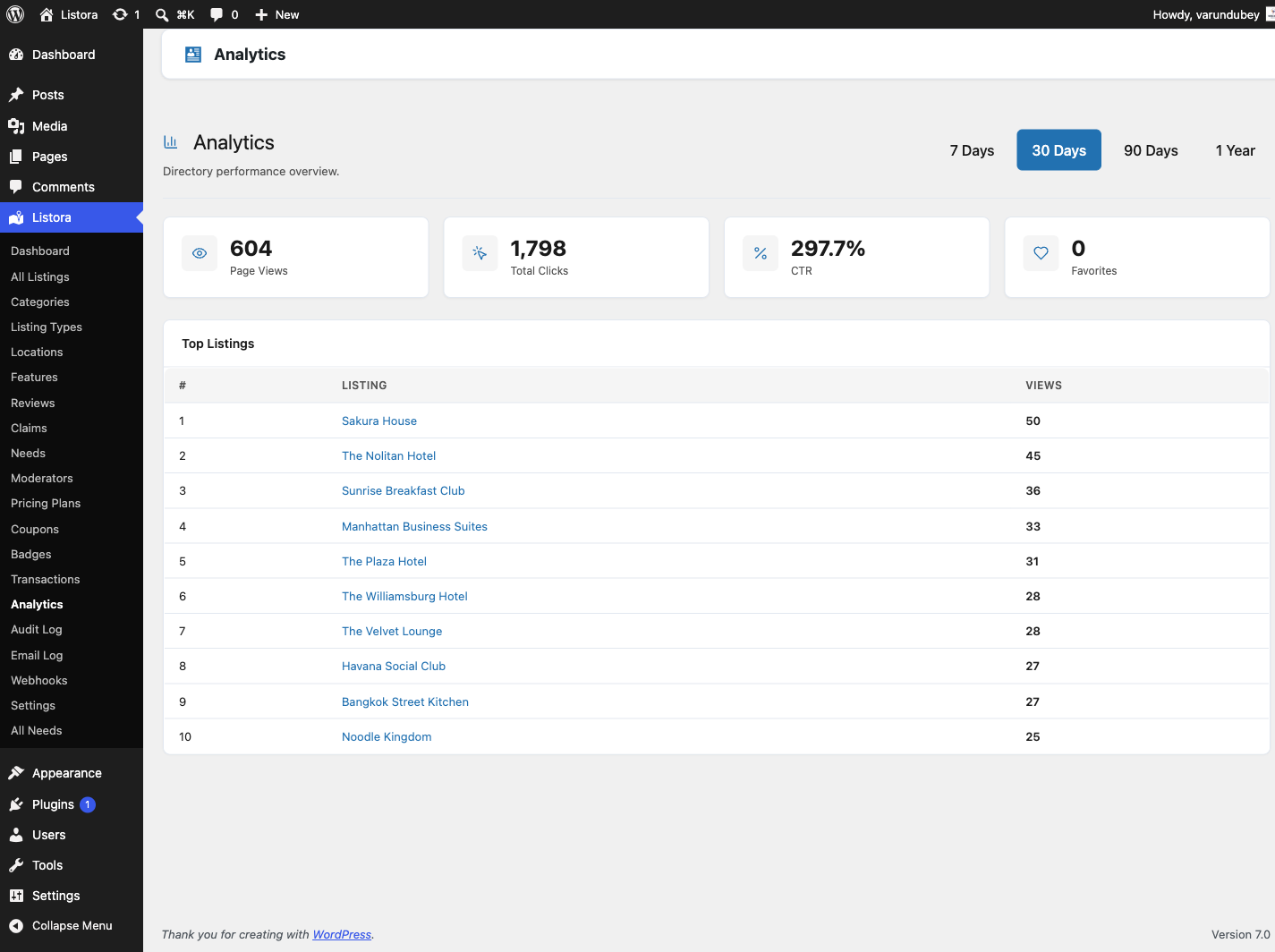
Go to Listora → Analytics. Use the buttons at the top right to choose the period: 7 Days, 30 Days, 90 Days or 1 Year. The screen has two tabs, Overview and Search.
Overview
- Listing views - how many times listings were opened.
- Contact clicks - phone, website, email and directions clicks added together.
- Click-through rate - contact clicks per listing view.
- Favourites and leads - how many listings were saved and how many contact-form messages were sent.
- Each tile shows its change on the previous period, for example "+12% on the previous 30 days", or "New this period" when there was nothing before.
- Views and contact clicks per day - a chart of the period with views and contact clicks as two lines. Longer periods group the chart by week. A table of the same numbers sits under the chart for screen readers.
- Top listings - the ten most viewed listings with their Views, Contact clicks and Rate.
Search
The Search tab shows what visitors search for. See Search analytics below.
Bot visits are excluded, and so are visits by people who can manage Listora settings, so your own browsing does not inflate the counts.
On the Listora dashboard
With Monetization on, the dashboard's last-30-days row also shows Money received. With Analytics on, it shows Listing views and Leads. Both link to their screens. Completed credit purchases appear in the dashboard's activity feed ("Alex paid 25.00 USD for credits"). Needs waiting for review appear in Needs attention as "posted needs to review".
For listing owners (member dashboard)
Members with at least one listing see an Analytics tab in their dashboard. It is shown whatever plan the listing is on. A plan does not switch it on or off.
- Pick a range: 7 days, 30 days or 90 days. The default is 30 days.
- A chart shows Daily views, all listings for the range.
- Each listing shows its Views, Clicks and Leads. Paused and expired listings are included.
- Open a listing to see its breakdown by event type for the range. The range buttons there let the member change it without leaving the page.
Tips
- Encourage owners to check their analytics each month. It is a strong reason to renew a paid plan.
- If you sell a featured upgrade, point owners at their analytics to show the difference in views.
- Analytics data is stored in the
listora_analyticstable, shared with Free. Do not truncate it by hand. - Views are tracked on listing page loads. Click events are sent with
POST /listora/v1/analytics/trackwhen a visitor clicks a phone, website, email or directions link. - To read the data in code, use
GET /listora/v1/analytics/listing/{listing_id}?period=30d. The period can be7d,30d,90dor1y. Site owners can useGET /listora/v1/analytics/overview. Seedocs/REST-API.mdin the Pro plugin. - Old analytics rows are removed by a cleanup job. The retention period is the
wb_listora_pro_analytics_retention_daysoption, 365 days by default.
Common issues
| Symptom | Fix |
|---|---|
| No Analytics screen or tab | Turn on Analytics in Listora → Settings → Features. A member also needs at least one listing to see the tab. |
| View counts not increasing | Bots and your own visits are not counted. Check the page is a single listing page. |
| Click events not tracking | Clicks are sent by JavaScript. Check the browser console for errors. |
| Counts look wrong after a migration | The listora_analytics table is separate from your posts. Include it in any site migration. |
Search analytics
The Search tab at Listora → Analytics records the search terms visitors use. It shows how many searches were made, how many different keywords, how many returned nothing and the share that returned nothing, followed by Top Search Keywords and Keywords With No Results. Each empty keyword has an Add Listing link, and Copy Keywords copies the list. This shows where your directory has gaps. You can also Export CSV.
Search term data is stored in the listora_search_terms table and pruned by the same retention job. Read it with GET /listora/v1/analytics/search, which needs the manage_listora_settings capability.