Outgoing Webhooks
Pro feature. Available in Listora Pro.
Availability: Pro only. Requires Listora Pro. Send real-time HMAC-signed HTTP POSTs to external systems (Zapier, n8n, Make, Slack, your CRM, custom services) whenever something happens in your directory - a new listing is published, a review is posted, a claim is approved, a coupon is redeemed. Webhooks are queued via Action Scheduler, retried on failure, signed for authenticity, and individually toggleable per endpoint per event.
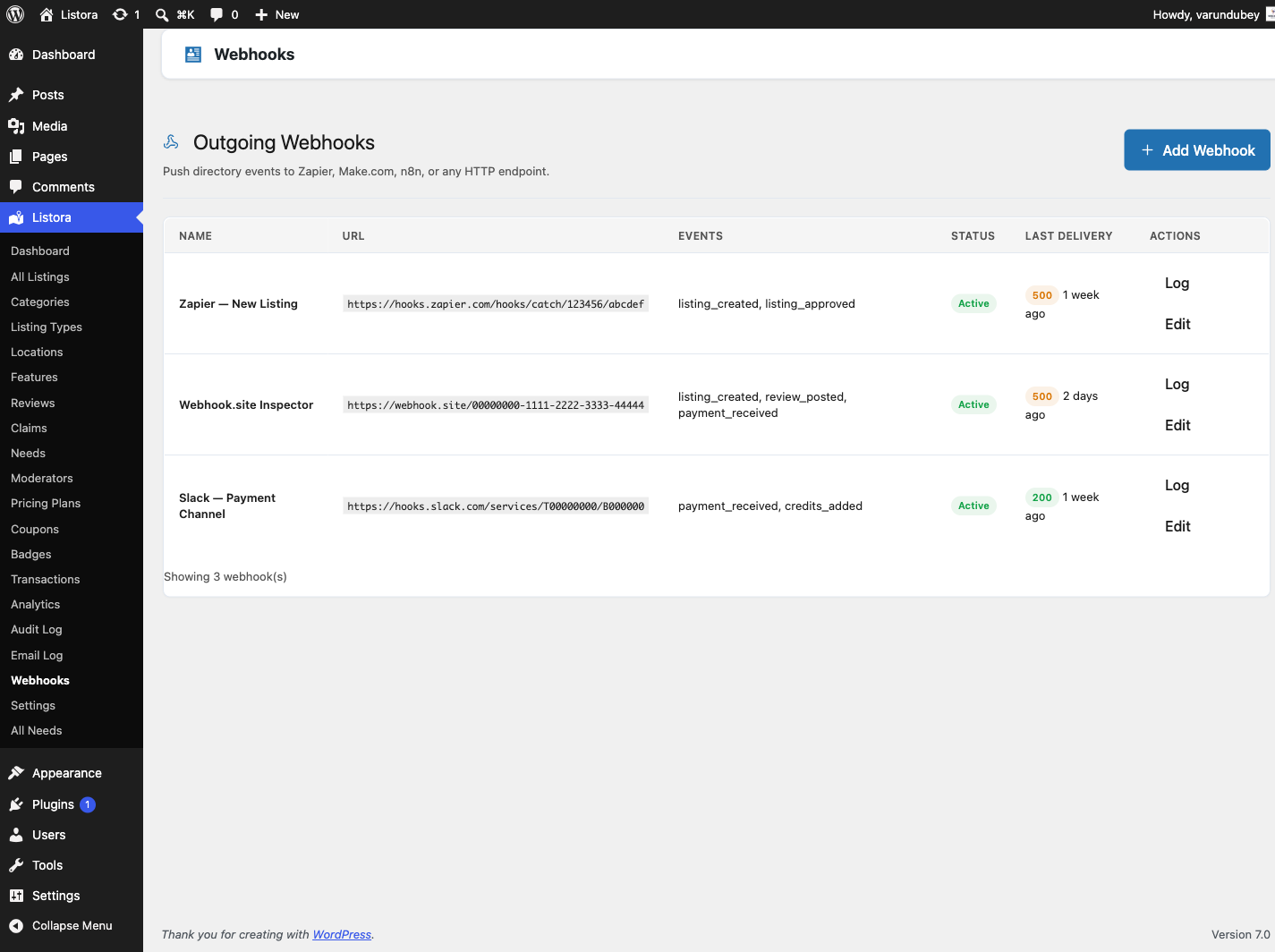
What it is
If you've ever wanted "when a new business listing is approved, post a message in Slack" or "when a review hits 5 stars, push the listing into our HubSpot pipeline" - that's what Outgoing Webhooks is for. It turns Listora into a first-class event source for the rest of your stack.
Under the hood:
- Endpoints are stored as a custom post type (
listora_webhook) so each subscription has its own row, status, delivery log and event subscriptions. - Every delivery is signed with HMAC-SHA256 using the endpoint's secret. The signature is sent in the
X-Listora-Signatureheader assha256=followed by the hex digest. Your receiver checks it before processing. - Deliveries run on Action Scheduler (
wb_listora_pro_deliver_webhookjob, groupwb-listora-pro), so a slow receiver never blocks your site. - A failed delivery is retried. There are four attempts in all, spaced 1 minute, 5 minutes and 30 minutes apart.
- Delivery logs persist. Each webhook keeps its latest 50 log entries with the response code, a body excerpt and the attempt number. A daily job (
wb_listora_pro_webhook_log_cleanup) trims older entries. - REST routes are registered (in
wb_listora_rest_api_init) so you can also create and manage webhooks programmatically.
Events available out of the box are read from the automation trigger registry since 1.6.0 - 25 triggers in Free plus 9 Pro ones, listed in full on that page. The event checkboxes on an endpoint are built from that registry, so every event offered is one that can actually be delivered. Before this, the list was hand-maintained here and had drifted: coupon_redeemed and need_posted were being dispatched with no way to subscribe, so every dispatch was discarded.
A sample of what is available:
| Event | Fires when |
|---|---|
listing_created |
A listing is created via REST submission |
listing_updated |
A listing's fields are edited |
listing_status_changed |
Status transitions (pending → publish, publish → expired, etc.) |
listing_expired |
Listing's expiration date passes (cron-driven) |
review_submitted |
A new review is posted |
review_updated |
A review is edited (or moderation status changes) |
claim_submitted |
A business-claim request is submitted |
claim_updated |
A claim is approved / rejected / reassigned |
coupon_redeemed |
A discount code is used at submission |
need_posted |
(Needs Marketplace) A need is posted publicly |
How you use it
As a site owner - set up a webhook
- Enable the feature: Listora → Settings → Features → Outgoing Webhooks. It is off until you turn it on.
- Open the webhook admin: Listora → Tools → Webhooks.
- Add a new endpoint. Click Add Webhook and fill in:
- Name - for example "Zapier - New Listings".
- Payload URL - the receiver address (your Zap, Make scenario, n8n workflow and so on).
- Secret (HMAC) - a long random string. A new webhook starts with one generated for you. Share it with the receiver.
- Events - tick the events this endpoint should receive.
- Status - Active or Paused.
- Click Save Webhook. The endpoint is live.
- Test it. In the list, use Send test on the row. The test goes through the normal delivery path and is logged. Open Delivery log to see the response.
Each row also has Edit, Pause or Resume, and Delete. Deleting a webhook deletes its delivery log. The receiving service is not told.
Webhook health
The Status column tells you whether a webhook is working.
| Status | Meaning |
|---|---|
| Active | Delivering normally. |
| Failing: 3 attempts in a row | Three delivery attempts in a row have failed. The number goes up with each further failure. A single successful delivery clears it. |
| Paused: kept failing | Ten deliveries in a row failed, each after all its retries, so Listora paused the webhook and stopped sending to that address. |
| Paused | You paused it yourself. |
A delivery spans about 37 minutes of retries, so a short outage on the receiving side does not pause a webhook.
When Listora pauses a webhook it emails the site's administration email address (Settings → General in WordPress). The email names the webhook, says how many deliveries failed, and links to the delivery log. Fix the receiver, then click Resume on the row. Resuming clears the failure count.
The email appears in Listora → Tools → Email Log. See Pro Emails.
As a developer - verify HMAC signatures
The receiver should:
- Read the
X-Listora-Signatureheader. Its value issha256=followed by the hex digest. - Recompute
hash_hmac('sha256', $raw_body, $secret)and compare it with the part aftersha256=, using a constant-time comparison. - Reject the request if the signatures do not match.
- Optionally check
X-Listora-Timestamp(Unix seconds) and reject old requests. The timestamp is sent as a header and is not part of the signed content. - Use
X-Listora-Deliveryto avoid processing the same delivery twice. It carries the sameidas the body, and a retry reuses it.X-Listora-Eventnames the event. - Process the JSON body. Top-level keys:
event,timestamp,site_url,version,id,data.versionis the schema version ofdata. Pin your parser to it; a payload shape change ships as a new version rather than mutating this one.idis a UUID per delivery per subscriber, and a retry reuses it - use it to make your receiver idempotent.datais built from the same serializers the REST API uses, so a listing here is the shapeGET /listora/v1/listings/{id}returns.versionandidwere added in 1.6.0; the original four keys are frozen.
Example PHP verification:
$body = file_get_contents( 'php://input' );
$signature = $_SERVER['HTTP_X_LISTORA_SIGNATURE'] ?? '';
$expected = 'sha256=' . hash_hmac( 'sha256', $body, $your_secret );
if ( ! hash_equals( $expected, $signature ) ) {
http_response_code( 401 );
exit;
}
$payload = json_decode( $body, true );
// ... process $payload ...
Settings & options
| Setting | Location | Default | Notes |
|---|---|---|---|
| Feature toggle | Listora → Settings → Features → Outgoing Webhooks | Off | |
| Endpoint list | Listora → Tools → Webhooks | - | One row per receiver |
| Per-endpoint events | (per row) | None until ticked | Subscribe each endpoint to specific events only |
| HMAC secret | (per row) | Generated for a new webhook | Used for X-Listora-Signature |
| Retry policy | (system) | 4 attempts: now, then +1 min, +5 min, +30 min | Retries on a non-2xx response or a network error |
| Request timeout | (system) | 10 seconds | Per attempt |
| Failing label | (system) | After 3 failed attempts in a row | Cleared by one successful delivery |
| Auto-pause | (system) | After 10 failed deliveries in a row | Emails the administration address |
| Log retention | wb_listora_pro_webhook_log_cleanup job |
Latest 50 entries per webhook | Older entries are pruned daily |
Developer hooks:
wb_listora_pro_before_outgoing_webhook(filter) - return aWP_Errorto stop an event from being sent to any webhook.
Related
- Automation Triggers - the catalogue of every event you can subscribe to, and its payload schemas.
- Payment Webhooks - the inbound side: how Listora accepts payment webhooks from Stripe/PayPal/Paddle.
- BuddyPress Integration (Pro) - another way to react to listing events, but routed into BP activity streams + notifications.
- Developer Reference: REST API - webhooks are also manageable via REST.
- Developer Reference: Hooks - the underlying
wb_listora_*events these webhooks listen to.