Advanced Settings
The Advanced tab in Listora → Settings is where the lower-traffic, higher-impact options live - cache TTLs for search results and facets, the index rebuild trigger, debug logging, uninstall behaviour, and the in-page Health Check report.
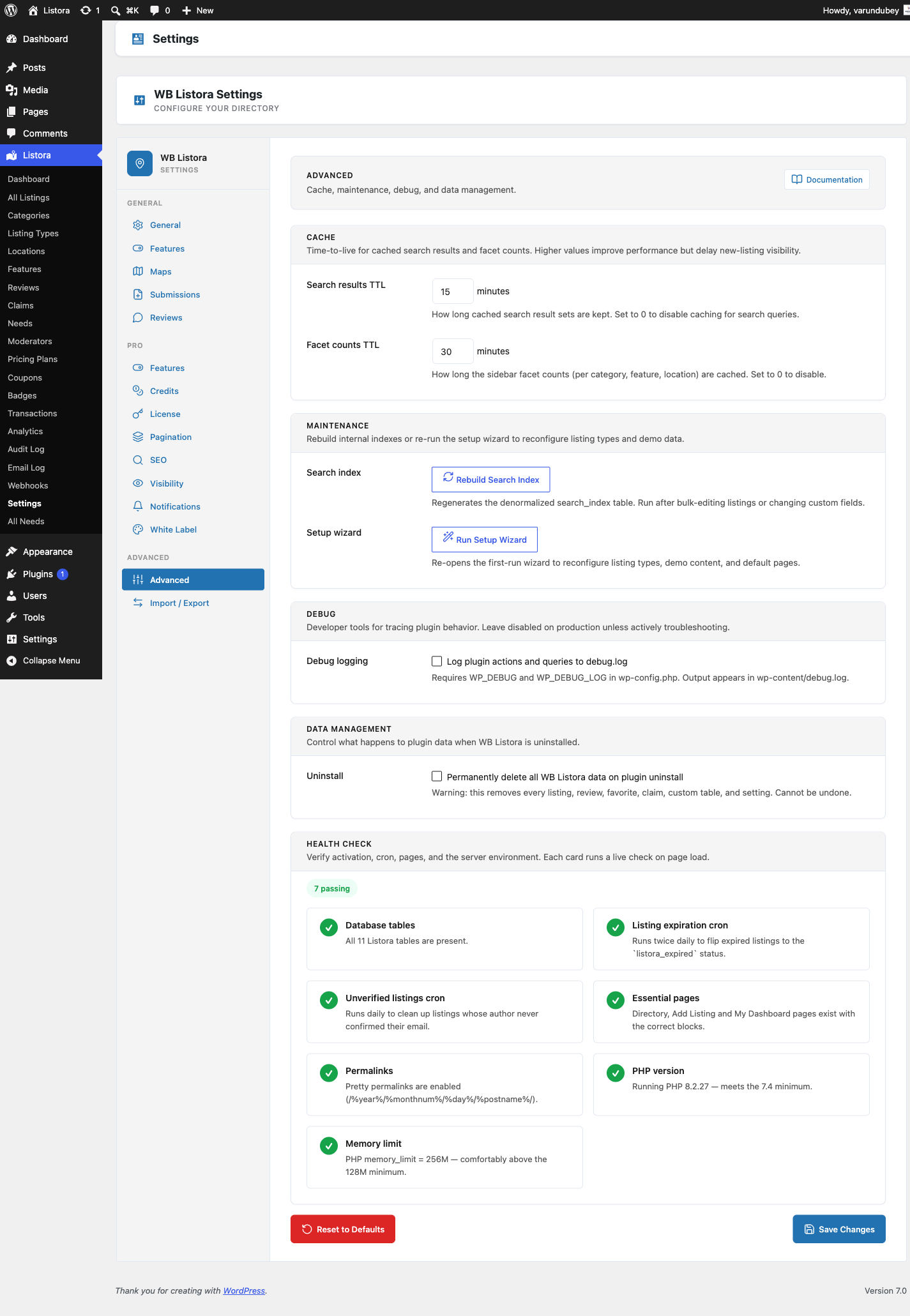
Where it lives
WP Admin → Listora → Settings → Advanced (?page=listora-settings&tab=advanced)
Requires the manage_listora_settings capability.
Sections
Cache
How long Listora keeps cached query results before refetching from the database.
| Setting | Default | Range | What it caches |
|---|---|---|---|
| Search results TTL | (per defaults) | 0-120 minutes | The full result set of a search query (keywords + filters). Higher = faster page loads + delayed visibility of new listings. Set 0 to disable. |
| Facet counts TTL | (per defaults) | 0-120 minutes | The sidebar facet counts (per category, feature, location). Higher = faster page loads + counts drift from reality. Set 0 to disable. |
When to lower these: sites where new listings need to appear instantly in search (job boards, classifieds with frequent new posts).
When to raise these: high-traffic browse-heavy directories where most visitors land on the same popular searches.
Cache invalidation is automatic on any write: a new listing publish bumps the cache key namespace, so the next read recomputes. The TTL is the upper bound, not the only invalidation trigger.
Setup wizard, app sign-in and legal links
- Setup wizard > Re-run setup walks through the first-run setup again: listing types, pages, map and demo content. Nothing you already set is removed.
- App sign-in > Password sign-in lets members sign in to the mobile app with their WordPress password. Turn it off to send them to the site to sign in instead, which suits sites that use two-factor authentication. App sign-ins that already exist keep working.
- Mobile app: legal links matters only if you publish the Listora mobile app.
- Terms of service: choose the terms page your site already has. Members must accept it to submit a listing, and the app links to the same page. If your terms live on another site, use Or an external URL instead. The selected page wins when both are set.
- Privacy policy URL is read from Settings > Privacy in WordPress and cannot be changed here. The page tells you when none is set or the page is not published.
- Community guidelines URL: an optional link the app shows.
- Abuse contact email: where people report objectionable content. The app stores require one.
Acceptance of the terms is checked on the server, so a submission that arrives without it is rejected whether it came from the form, the API or the app.
Maintenance
| Control | What it does |
|---|---|
| Rebuild Search Index | Rebuilds the search table from current listing data. Use it after bulk-editing many listings, changing the fields of a listing type, or after a CSV import that skipped the automatic rebuild. It runs in the background and can take a few minutes on a large directory. Equivalent to wp listora reindex. |
| Setup wizard | Run Setup Wizard re-opens the first-run wizard. It does not delete anything. |
| Re-run Demo Import | Queues a background import of the default demo listings. If demo data already exists you are asked to confirm first. |
| Delete Demo Data | Permanently removes everything demo content added: the demo listings and their images, the categories and other terms that only demo content used, the demo member accounts, and the sample views and clicks. Your own listings are never touched. Terms you have since used for your own listings are kept, and anything a demo account wrote is handed to you instead of being deleted. The button is disabled when no demo data is present. |
Debug
| Setting | Default | What it does |
|---|---|---|
| Debug logging | Off | When on, Listora writes per-query and per-action breadcrumbs to wp-content/debug.log. Requires WP_DEBUG + WP_DEBUG_LOG in wp-config.php - without those, this toggle has no effect. Leave off on production except for active troubleshooting. |
Data Management
| Setting | Default | What it does |
|---|---|---|
| Permanently delete all Listora data on plugin uninstall | Off | When on, deactivating + deleting the plugin removes every listing, review, favourite, claim, custom table, and Listora option. Cannot be undone. When off (default), data persists so reactivating brings everything back. Same safety pattern as WooCommerce. |
Health Check
Inline diagnostic panel rendered by WBListora\Admin\Health_Check::render_section() - folds the previous standalone Health Check submenu into this tab so all diagnostics + maintenance live together. Shows green / amber / red signals for:
- WordPress version + PHP version + memory limit
- Listora database tables present and indexed
- REST API reachable
- Search index sync % (compares index row count to
publishlistings count) - Geo index sync %
- Outbound email reachable (last
wp_mailresult) - Pro license status (if Pro active)
- Cron scheduler (Action Scheduler vs WP-Cron fallback)
Any red flag links to the matching docs page or the relevant settings tab.
Equivalent WP-CLI
# Maintenance
wp listora reindex # = Rebuild Search Index button
wp listora reindex --type=hotel # Reindex one type only
wp listora repair # Clean orphan search_index + geo rows
wp listora stats # Show sync % + table sizes

# Cache flush (via WP-CLI cache commands)
wp cache flush # All-cache flush
How to use
- First-time tuning: leave the cache TTLs at defaults. Lower them only if you observe stale data.
- After bulk edits: click Rebuild Search Index to refresh the denormalized table.
- Troubleshooting: turn Debug logging on, reproduce the issue, check
wp-content/debug.log, then turn it back off. - Before going live: set Uninstall behaviour according to your data retention policy.
- Periodic health checks: scroll to the inline Health Check section to surface any red flags.
Related
- WP-CLI Commands - every CLI equivalent for the maintenance buttons.
- General Settings - site-wide configuration (slugs, page IDs).
- Notifications Settings - email event toggles.
- Email Log - recent outbound notification activity.
- Capabilities & Roles - who can access this tab.